SHARE

How Contractors Can Handle Missed and After-Hours Customer Calls

Missed and after-hours calls for contractors need one agreed intake path: capture the request, identify urgent or unusual situations, and give the right person a clear follow-up task. The system can collect details and apply your team’s rules, while your team keeps control of dispatch, pricing, safety decisions, and exceptions.
Calls are missed for ordinary reasons. An owner may be driving or quoting. Office staff may be helping another customer. Technicians may be on a roof, in a crawlspace, or unable to answer safely while working. After-hours calls create another gap because normal office coverage has ended.
Table of Contents
A Workflow for Missed and After-Hours Contractor Calls
The issue is often not that every caller must speak to a person immediately. It is that the next person receives too little context to make a good decision. A phone number and vague voicemail force the office to call back, repeat the same questions, and work out whether the request is routine or urgent.
A better process gives the follow-up person a structured record: who called, where the work is needed, what happened, how urgent it may be, and how the caller prefers to be contacted.
Use three call paths: routine, overflow, and after-hours
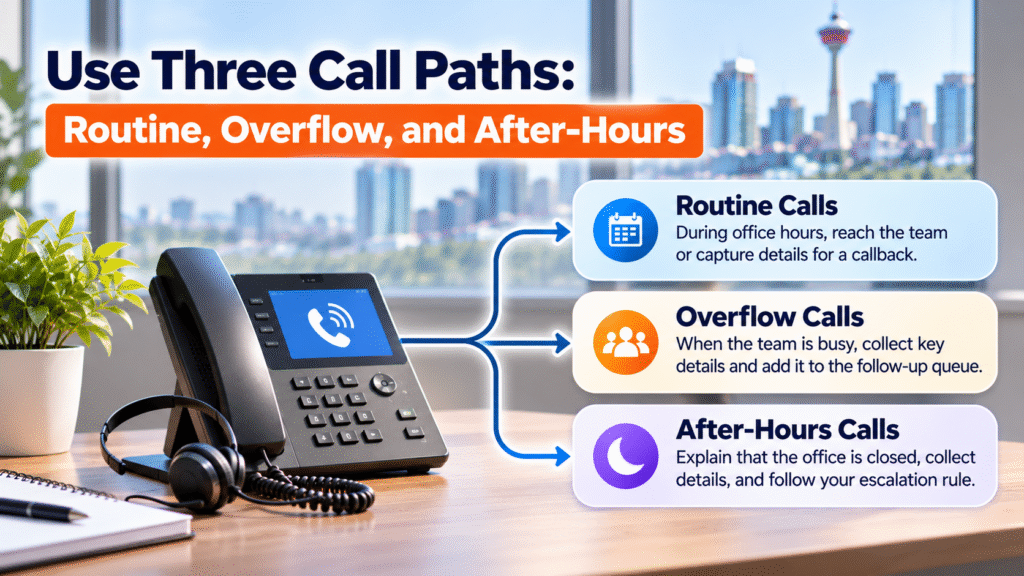
Routine calls
During normal office hours, callers should reach the usual team whenever possible. If no one can answer after the agreed number of rings, the intake path can greet the caller, explain that the team is unavailable, and collect the details needed for a callback or scheduling review.
The office receives a clear call record instead of only a missed-call notification. A team member reviews it, confirms any appointment, and decides what happens next.
Overflow calls
Overflow calls happen when people are available but already occupied. A receptionist may be helping another customer, dispatch may be handling schedule changes, or a storm may bring several enquiries at once.
For these calls, the intake process should ask the same core questions the office would normally ask. It can place the record in the team’s usual queue and notify the person responsible for follow-up. It should not promise a booking or service time that the team has not confirmed.
After-hours calls
After-hours coverage needs clear rules. The greeting should explain that the office is closed, collect the required details, and state the follow-up window approved by the business. If there is an on-call person, the process can apply the escalation rule your team has set.
If there is no after-hours coverage, the system should not imply immediate service. It can acknowledge the request, capture the details, and create a next-business-day follow-up task.
What should a contractor capture on every call?
The first conversation does not need to diagnose the job. It needs enough reliable information for the next person to act without restarting the conversation.
- Caller name and preferred phone number
- Email address, when it is useful for follow-up
- Service address, unit number, and relevant access details
- Job type or reason for calling, in the caller’s own words
- Useful symptoms or job details, such as no heat, a leak, an electrical concern, storm damage, or an estimate request
- Urgency and approved safety-screening information
- Preferred follow-up method and availability
- The next action, assigned person, and follow-up time under your business rules
This record should be consistent whether the caller reaches an office coordinator or an automated intake path. The follow-up team should not have to guess which details are available.
When urgent or unusual calls need a person
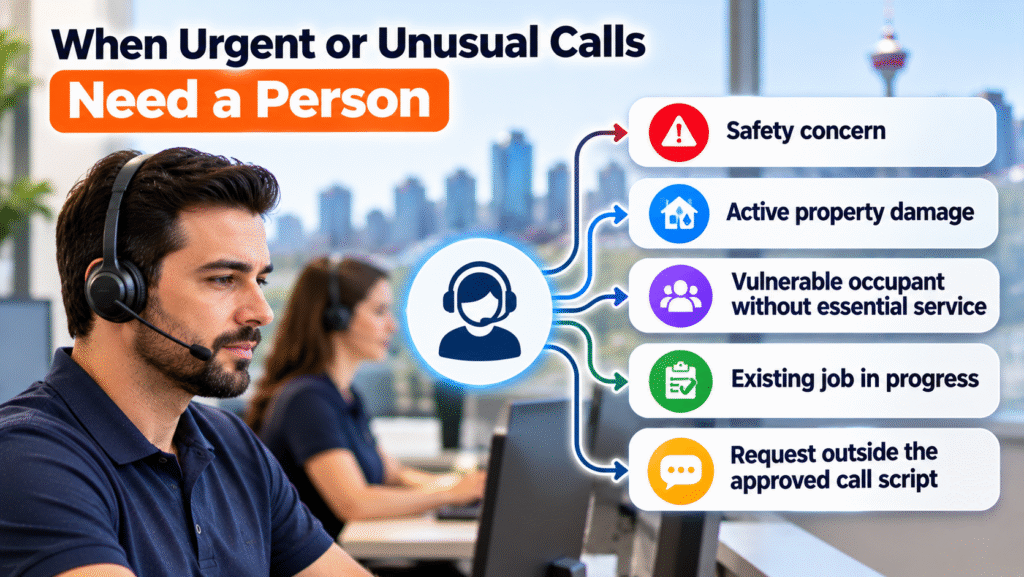
An intake workflow needs a short list of situations that always receive human attention. The exact list should be set by the contractor because it depends on the trade, coverage hours, local requirements, and who is on call.
For example, a call may be flagged for a person when the caller reports a safety concern, active property damage, a vulnerable occupant without essential service, an existing job in progress, or a request outside the approved call script.
For a suspected gas leak, a carbon monoxide alarm or another emergency, the script should direct the caller to the appropriate emergency service or gas utility according to official guidance.
The call record should show why it was escalated and who received the notification. The caller should receive only the language your team has approved. Intake can acknowledge a request and explain the next step. A person decides whether to dispatch, give safety guidance, change a schedule, quote a price, or make an exception.
A proposed after-hours plumbing workflow
Proposed workflow, not a client result: A customer calls a plumbing company at 9:30 p.m. about water under a sink. The intake path confirms the caller’s name, callback number, address, whether water is actively flowing, whether the main shutoff is accessible, and whether anyone is at risk. It also records the caller’s preferred contact method.
If the answers meet the contractor’s approved urgent-call rule, the complete record is sent to the on-call person. If they do not, the workflow creates a first-morning callback task. In both cases, the plumber or dispatcher decides the service response. The intake process captures and passes on the facts. It does not diagnose the repair or commit the business to a response time.
Automation handles intake. Your team keeps control.
A useful call-intake setup starts with the hours, greetings, questions, and escalation rules your team already uses. Test it with routine calls, a busy-period scenario, and an after-hours scenario. Then review the call records with the people responsible for follow-up.
Your team should be able to change coverage hours, revise a question, pause a route, and review every record. Exceptions should go to a person by design. Where appropriate, the call record can connect to your scheduling, job-management, CRM, or accounting tools so staff do not re-enter the same information. Learn more about system integration services for field-service workflows.
Watch the AI Receptionist call-intake demo
Diligentic’s AI Receptionist for Contractors demonstrates a call-intake workflow that can answer routine, missed, and after-hours calls, capture caller and job details, and prepare a record for human follow-up.
A practical workflow for missed and after-hours calls for contractors should collect the right details, escalate defined exceptions, and leave service decisions with the team.
https://www.youtube-nocookie.com/embed/_XVllK5RQX8?rel=0&modestbranding=1
Demo disclosure: This is an AI Receptionist capability demo using Summit Peak Roofing, a fictional company. It is not a Diligentic customer case study and does not claim measured client results.
Frequently asked questions
Can an AI receptionist handle after-hours contractor calls?
Yes. An AI receptionist can follow the coverage hours, greeting, intake questions, and escalation rules approved by your business. It can capture the caller’s details and route urgent requests to a person, while your team remains responsible for dispatch, pricing, safety guidance, and exceptions.
What details should be collected from a missed call?
A missed-call workflow should capture the caller’s name, callback number, service address, job type, relevant symptoms or request details, urgency, preferred follow-up method, and availability. The follow-up team should receive a clear next action rather than a phone number alone.
How should contractors handle urgent after-hours calls?
Contractors should define which situations require immediate human escalation, who is on call, and how that person is notified. The intake process can flag the call and send the approved details, but a person should decide whether to dispatch, provide safety guidance, change a schedule, or make an exception.
Will automation book jobs or make service promises automatically?
It does not have to. A contractor can configure the workflow to collect details and create a follow-up task without confirming an appointment or response time. Your team chooses what the system can say, what it can collect, and when a person takes over.
Can call-intake records connect to our current tools?
Where the required connection is available, a call record can be sent to the scheduling, job-management, CRM, or accounting tools your team already uses. The workflow should be tested with your real fields, access rules, and exception process before it is used for live calls.
Assess your current call path
Start with the point where your team loses context most often: calls that ring out during busy hours, calls that reach voicemail after closing, or urgent requests with no reliable escalation rule. Map the current path, define what a person must decide, and make the intake record useful to the person who follows up.
If you are evaluating whether a call-intake workflow fits your business, review the AI Receptionist for Contractors solution page. It explains what the workflow can collect and where human handoff remains in place.
About the author
Ajay Kumar
Founder and Director
About the author
Ajay Kumar is the founder and director of Diligentic Infotech, a Calgary AI automation company. He has 9+ years of hands-on technical experience and now focuses on helping small and medium businesses connect their existing tools and cut down manual work through practical AI automation. He leads with a clear focus on real, working solutions over one-time demos.

Posted on 30 Oct 2026
How AI Companies Are Helping Calgary Businesses Build Smarter, Scalable Digital Solutions in 2026
AI companies can help Calgary businesses grow by reducing repeated work between the tools their teams already use. A useful project starts with one process, such as moving an approved job update from the field to the office. Connections handle predictable steps; AI can help interpret a message or document when rules alone cannot. Employees keep decisions that require business judgment.
Posted on 19 Oct 2026
How Calgary Contractors Can Handle Repetitive Customer Emails Without Writing Every Reply From Scratch
Repetitive customer emails for contractors often create the same office work under different subject lines. A question may look new because the wording changes, while the appropriate reply follows an established business rule. If employees repeatedly build those replies from scratch, start by identifying the pattern before deciding whether templates or AI-assisted drafts will help.

Posted on 27 Oct 2026
Why Calgary Contractors Struggle With Customer Email Management and Finding the Right Information Before Replying
Calgary contractors struggle with customer email management when job details, schedules, and previous conversations sit in separate tools. Before replying, employees must identify the correct job, check the latest information, and resolve gaps or conflicting records. An AI customer support email assistant can help retrieve permitted information and prepare a draft, while an employee verifies the answer and sends it.