SHARE

How AI Companies Are Helping Calgary Businesses Build Smarter, Scalable Digital Solutions in 2026

AI companies can help Calgary businesses grow by reducing repeated work between the tools their teams already use. A useful project starts with one process, such as moving an approved job update from the field to the office. Connections handle predictable steps; AI can help interpret a message or document when rules alone cannot. Employees keep decisions that require business judgment.
For an owner, scalable means the process still works when more jobs arrive, another employee takes over, or an expected record is missing. It should not depend on the owner remembering to forward every update.
Table of Contents
Follow a job update from the field to the invoice
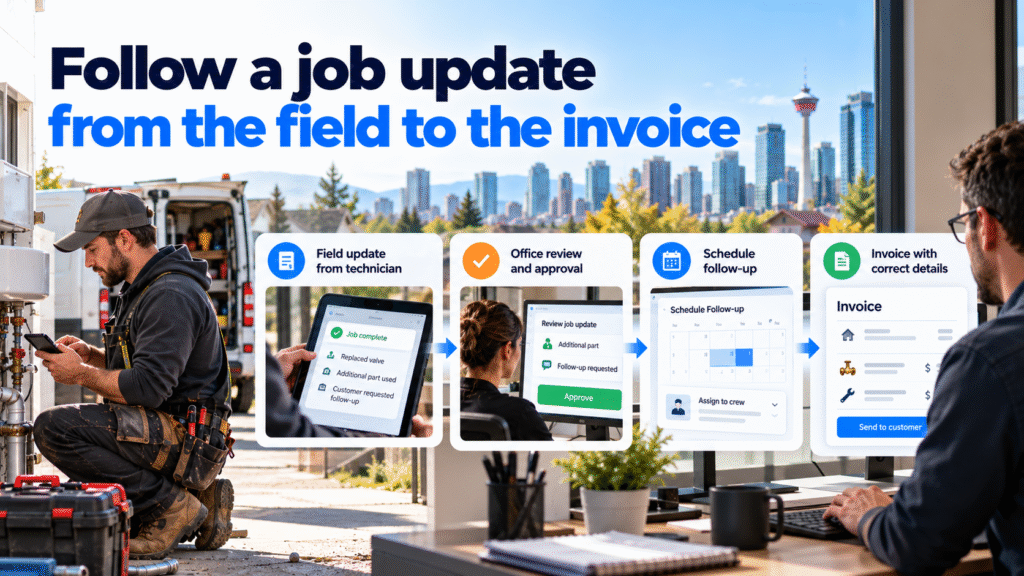
Picture a Calgary plumbing office after a technician finishes a repair. The field record says the job is complete. The technician mentions an additional part in a note. The customer has asked for a follow-up. Accounting cannot prepare the final invoice until the approved scope and part information reach the right record.
The business may already have a scheduling tool, job tracker and accounting platform. The repeated work sits between them: reading the note, checking approval, updating the job, assigning the callback and giving accounting the correct details.
Before considering AI, trace one request from the first message to the final customer response. Identify where its details are recorded, who approves changes and who owns the next action.
The wider interest in AI is real, but national adoption figures are not proof of a Calgary result. A 2026 Statistics Canada analysis reports that 12.2% of Canadian firms used AI to produce goods or deliver services in 2025. That measure does not say how many Calgary trade businesses use AI or whether a particular project saved money.
How a Calgary contractor workflow could improve
Hypothetical scenario, not a client result. A plumbing company uses a shared inbox, a job tracker and accounting records. A customer emails about a completed repair. The technician’s note says, “Replaced valve; used an extra fitting after opening wall.” The office needs to answer the customer and prepare the final billing information.
Today, an administrator reads the email, searches the job history and asks the technician whether the extra fitting was included in the approved work. Another employee later copies the confirmed amount into accounting. When anyone is away, the request can sit in a personal inbox.
A connected workflow could proceed in stages:
- Link the customer message to the correct job, or flag it when the match is uncertain.
- Keep the technician’s note available as source material. An AI step may suggest that it mentions additional material and point the employee back to the note.
- Have an authorized person check whether the extra work and amount were approved. An AI suggestion cannot authorize a charge.
- Once approval is recorded, use ordinary rules to update the job and create the appropriate office and accounting tasks.
- Have an employee check and send the customer’s reply. Keep the assigned follow-up visible until it is complete.
If two jobs match the customer, a person resolves the match. If the accounting connection fails, the task stays open and alerts its owner. A useful workflow makes those failures visible instead of quietly moving on.
Diligentic’s Calgary plumbing page describes related dispatch, job-change and invoicing handoffs. This example illustrates a possible process; it does not claim that a particular customer uses this setup.
What makes a solution capable of handling growth?
Adding more AI requests to a fragile process will also add more exceptions. Test whether the underlying workflow can handle greater job volume and changes in staffing.
Look for these properties:
- One source for each important fact. The approved job scope, appointment status and payment balance each have a defined owner and record.
- Clear permissions. Employees and connected tools can access the information needed for their tasks, with sensitive records restricted.
- A way to handle exceptions. Missing approvals, conflicting details and connection failures create assigned work.
- Visible progress. The office can tell whether a request is new, awaiting approval, assigned or complete.
- Repeatable checks. A new employee can follow the same process without relying on the owner’s memory.
Consider the same plumbing office handling 10 completed jobs in a week, then 50. At 10, an administrator may remember which technician to ask about an extra part. At 50, that memory is a weak control. The process needs the same approval record, named follow-up owner and visible exception for every job.
A connected workflow can make those steps easier to track, but the business must test whether its staff, tools and review process can support the higher volume. This example illustrates a design test, not a promised capacity increase.
Give each part of the process the right job
Ordinary automation is well suited to moving approved fields, creating tasks, updating a status and sending a predefined notification. These actions need reliable connections and clear conditions.
AI is most useful when incoming information does not follow a fixed form. It can propose a summary of the technician’s note, identify a possible customer question, or point an employee to the passage that needs attention. A reviewer checks the source before relying on that interpretation.
People decide whether extra work is billable, how to resolve a complaint, what to promise a customer and whether an unusual job is ready to close. This division keeps repetitive preparation work moving while preserving accountability.
Diligentic’s system integration service covers connections between existing job, customer and accounting tools. A specific implementation still depends on the platforms’ access, data quality and approval rules.
Check what happens after the AI project goes live
When comparing providers, use a recent job that needed an approval or follow-up. Ask each provider to show how its proposed process would handle that job, including a missing detail or failed connection. Then check the practical commitments behind the proposal:
- Where will the first change begin and end? Identify the event that starts the work and the record or action that marks it complete.
- Which records control the answer? Identify where each fact comes from and who corrects it when it is wrong.
- What happens when the process fails? Test ambiguous matches, missing approvals and unavailable connections.
- Who approves customer-facing or financial actions? Keep that authority explicit.
- How will results be measured? Compare preparation and review time, corrections, missed follow-ups and customer clarification requests for similar cases.
- Who owns the data and workflow? Confirm where records are stored, how they can be exported and what happens if the provider relationship ends.
- Who maintains the system after launch? Ask who updates AI instructions, rules and connections when forms, tools or staff responsibilities change.
- What documentation will staff receive? Request a workflow map, approval points, failure alerts and steps for resolving common errors.
- Who can access each record and action? Review permissions for employees, the provider and connected services, including who can approve a charge or send a customer message.
- What will it cost to run and change? Separate the initial build from subscriptions, usage charges, monitoring, support and future updates. Ask what happens to those costs if job volume rises.
Ask whether a saved template, a simple connection or an existing feature already solves the problem. If AI is proposed, the provider should explain which step needs interpretation and how staff will inspect its output.
A credible plan defines a first usable release and a test your office can run before expanding the workflow.
Pilot one process before expanding it
Choose a repeatable category with dependable records. Document how the office handles it now, including active staff time, corrections and requests that require an owner to intervene.
Run the proposed workflow with a clear review process. Keep generation time separate from the time employees spend checking output or waiting for another person’s decision. Record why suggested actions were rejected and which source records need improvement.
If the pilot reduces copying but increases correction work, repair the input or rules before adding more departments. If it works reliably, expand to the next related handoff. That sequence provides a concrete way to assess whether the process can handle growth.
Diligentic’s AI workflow assessment is designed to map current work, identify suitable opportunities and outline priorities before a build. The assessment helps decide what to change; it does not perform the automation.
FAQs
Does every growing business need a custom AI system?
No. A clearer process, an existing tool feature or a straightforward connection may solve the immediate problem. Use AI when interpreting variable information adds value that staff can verify.
Can an AI company work with existing business tools?
Often, but the answer depends on available connections, permissions and data quality. Test the required records and failure behaviour before promising a specific integration.
What should a Calgary owner measure in an AI pilot?
Measure the work the project intends to change: active staff time, corrections, missed handoffs and review effort. Compare similar cases and record how many were tested before drawing conclusions.
What does a workflow assessment provide?
It examines how work moves through the business, where employees repeat tasks and which changes are worth exploring. Implementation requires a separate, agreed scope after that assessment.
Choose one workflow worth improving
Look for a request your team handles every week by copying information, checking several tools or chasing an approval. Write down where it begins, which record controls the answer and who owns the next step.
Diligentic can review that process, assess whether existing tools should be connected and identify where AI interpretation would be useful. Book a qualifying call about your workflow. If there is a fit, Ajay arranges an in-person workflow audit in Calgary after qualification.
About the author
Ajay Kumar
Founder and Director
About the author
Ajay Kumar is the founder and director of Diligentic Infotech, a Calgary AI automation company. He has 9+ years of hands-on technical experience and now focuses on helping small and medium businesses connect their existing tools and cut down manual work through practical AI automation. He leads with a clear focus on real, working solutions over one-time demos.

Posted on 29 Oct 2026
Customer Support Email Automation: Spend Less Time Drafting Replies for Your Calgary Contracting Business
For a Calgary contractor, customer support email automation can turn a booking question and the corresponding job details into a reply ready for an office employee to check. The AI customer support email assistant handles the initial wording; the employee confirms the appointment information, corrects the message, and sends it. Begin with a common request that your office can answer from current records.

Posted on 27 Oct 2026
Why Calgary Contractors Struggle With Customer Email Management and Finding the Right Information Before Replying
Calgary contractors struggle with customer email management when job details, schedules, and previous conversations sit in separate tools. Before replying, employees must identify the correct job, check the latest information, and resolve gaps or conflicting records. An AI customer support email assistant can help retrieve permitted information and prepare a draft, while an employee verifies the answer and sends it.

Posted on 23 Oct 2026
Inconsistent Customer Email Replies: How Calgary Contractors Can Use an AI Customer Support Email Assistant for More Consistent Communication
A customer emails a Calgary contracting company with a question about a service appointment.
One employee responds with a detailed explanation. Another gives a short answer. A third uses different wording and explains the next step differently.