SHARE

Electrical Workflow Automation for Calgary Contractors: Reduce Office Work or Hire More Staff?

More electrical jobs create more than fieldwork. They also create appointment changes, customer questions, work orders, material records and invoices. When office staff must move those details between tools by hand, a growing crew can make the office feel short-staffed.
Electrical workflow automation can reduce repeatable tasks, but it cannot answer every customer question or make every job decision. Before hiring or automating, a Calgary contractor should identify what work is taking the time. The answer may point to a clearer process, a connection between existing tools, another employee or a combination of them.
Table of Contents
Why the office gets busier as the crew grows

With a small crew, a dispatcher may remember which electrician is available and which job still needs an update. That becomes harder as the company takes on more service calls and projects. One rescheduled visit can affect the customer’s arrival window, a technician’s next assignment and the office schedule.
The volume of records grows too. Labour, materials, purchase orders, approved changes and billing milestones must reach the people who need them. If those details are kept in separate messages and tools, staff spend time checking which information is current.
Diligentic’s electrical contractor page describes the estimating, dispatch and invoicing handoffs involved in this work. The first question for an owner is which of those handoffs repeatedly needs office attention.
Find the tasks behind the workload
Ask the office team to note what they handle over a typical week. Do not group every activity under “administration.” Record the reason someone had to act.
A dispatcher might spend time entering an approved schedule change in two places. Billing might contact electricians for material quantities. An estimator might review an unexpected scope change. A customer-service employee might spend an hour resolving a complaint. These tasks have different solutions.
Look especially for work that is repeated for each job: copying details, checking whether another person has responded, sending standard updates and searching for a missing record. Then mark the decisions that require experience, customer contact or authority.
This gives the contractor a useful distinction. A routine update may be suitable for a rule. An unclear closeout requirement may need a process change. Sustained customer-service demand may call for another person.
Which office steps can be automated?
A good candidate has a clear trigger, a defined next step and an outcome employees can verify. An approved appointment change can update the schedule and notify the assigned electrician. When a technician marks a job complete, a workflow can check whether required labour hours, material details and approvals have been recorded before preparing an invoice draft.
The completion status is only the start of the billing check. It does not by itself mean the job is ready to invoice. A missing entry or unresolved change should create a task for its owner rather than move an incomplete amount to the customer.
Most of these actions use rules and connections between tools. AI can assist when information is less structured. It might flag a technician’s note as a possible scope change or help draft an estimate using approved pricing data. An authorized employee remains responsible for the final price, customer approval and electrical safety decisions.
Diligentic’s process automation service addresses the triggers, assignments, approvals and exception paths needed to keep this work moving.
When to improve the process, automate or hire
Use the work itself to guide the choice. The table is a starting point, not a rule that every contractor must follow.
| Work creating pressure | First response to consider |
|---|---|
| Customer or job details entered repeatedly | Check whether existing tools can share approved information |
| Missing information on completed jobs | Clarify the field closeout requirements and assign an owner |
| Routine appointment confirmations | Use an approved message rule |
| Customer complaints and complex questions | Provide enough employee time to respond |
| Unusual estimating or changed scope | Keep an estimator or project lead responsible |
| Dispatch conflicts involving skills and urgency | Give the dispatcher current information and decision authority |
| Sustained customer-service demand | Consider additional staff capacity |
| A short seasonal rise in routine updates | Review temporary coverage and a focused workflow |
A checklist may resolve a problem without new technology. Automation can reduce predictable handoffs. Hiring provides time and judgment for work that needs a person. A growing contractor may need all three at different points.
Compare the cost of automation and hiring
First define the work that must be performed. A connection between tools cannot provide someone to handle difficult customer calls. A new employee can provide that coverage, but hiring alone may leave duplicate entry in place.
| Automation costs to assess | Hiring costs to assess |
|---|---|
| Initial setup and integration | Recruitment and onboarding |
| Subscriptions or hosting | Salary and benefits |
| Monitoring and ongoing support | Training and supervision |
| Employee time handling exceptions | Coverage and scheduling |
Compare the options against the same identified workload. Include the work employees will still perform after automation and any new responsibility for checking failed updates. Avoid treating an estimated hour saved as a cash saving unless an actual cost changes.
A Calgary electrical job with several paths
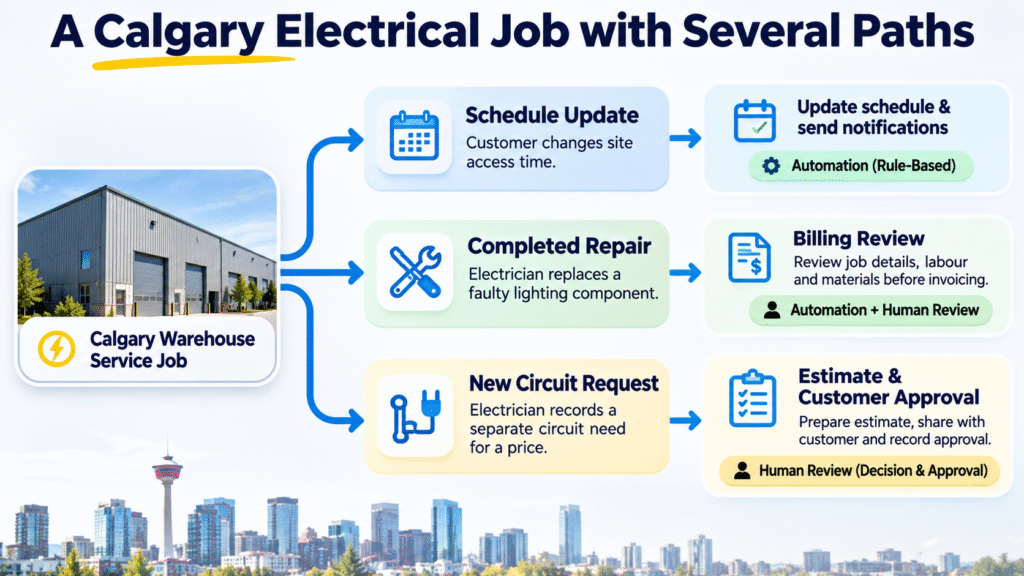
Consider a hypothetical service visit at a small Calgary warehouse. After booking, the customer changes the site access time. During the visit, the electrician replaces a faulty lighting component and records a separate circuit issue that the customer wants priced.
Once the new access time is confirmed, a rule can update the schedule and send the appropriate technician and customer notifications. The electrician records the replacement component and labour against the service job. If those details are missing at closeout, a task goes back to the electrician.
The circuit issue follows a different path. A project lead reviews the note and prepares any required estimate. The customer’s decision is recorded under the applicable agreement. The request does not become a charge on the repair invoice simply because the electrician mentioned it.
For a larger project, the billing review may also need an approved change order, contract milestone or permit or inspection record where applicable. Calgary’s electrical permit guidance describes local permit and inspection processes; it does not make an inspection a condition for every invoice. Qualified people remain responsible for technical and compliance decisions, while billing follows the contract’s requirements.
What changes in daily office work
The aim is to make the next action visible, including when something goes wrong.
| Handoff | When staff manage every step manually | With a defined workflow |
|---|---|---|
| Confirmed schedule change | Dispatcher updates the schedule and sends separate messages | The update triggers the approved notifications |
| Job closeout | Billing searches for missing hours or materials | Required details are checked and gaps assigned |
| Invoice preparation | Staff rebuild approved details from several records | Complete information prepares a draft for the required review |
| Failed transfer | The job may appear to have moved forward | An alert identifies the failure and its owner |
Connecting the existing tools depends on their available interfaces, permissions, data quality and compatible fields. Use a consistent job identifier so an update can be traced. Diligentic’s system integration service is relevant when scheduling, job and accounting records need to share approved information.
Start with one handoff
Choose a task that causes repeated work or delays many jobs. Completed service jobs waiting for invoice preparation are one possible starting point. Review recent jobs and note what billing had to request, who supplied it and when the invoice was sent.
Define the required information and the person responsible for each exception. Test a normal job, a missing material entry, an unapproved change and a failed accounting transfer. Staff should be able to see where each case stopped and what they need to do next.
Only then expand the workflow. Connecting several processes at once makes it harder to tell which change helped and which one created a new problem.
Measure the result before deciding on staffing
Compare similar jobs before and after the change:
| Measure | What it shows |
|---|---|
| Administrative minutes per job | Whether repeated office handling decreased |
| Duplicate entries | Whether the same detail is still typed into several tools |
| Jobs missing completion details | Whether field records reach billing ready for review |
| Completion-to-invoice time | Whether completed work moves through billing sooner |
| Exceptions needing a person | How much judgment and correction work remains |
| Setup and maintenance costs | What the workflow requires to operate reliably |
Include time spent correcting records and reviewing AI suggestions. Preparing an invoice sooner is an operational result; customer payment timing should be measured separately.
These figures help answer the hiring question. If routine handling falls but the team still faces sustained demand for customer conversations, dispatch decisions or estimating, another employee may be the right investment.
Frequently asked questions
Will electrical workflow automation replace office employees?
It can reduce repeated tasks. Employees still handle customer relationships, complex scheduling, estimates, approvals and exceptions.
Can contractors connect the tools they already use?
Often, but a proposed connection must be checked against the tools’ available interfaces, permissions and data quality. It also needs a way to identify and correct failed updates.
When is hiring the better choice?
Consider hiring when the remaining workload consistently needs a person’s time, judgment or customer-service coverage. Measure that workload after removing avoidable repeated steps.
Can a small electrical contractor benefit from automation?
Yes, if one repeated task already consumes meaningful office time. A clearer checklist or better use of an existing tool may be the appropriate first improvement.
Which handoff should be reviewed first?
Choose one with a frequent, measurable problem. Schedule changes, approved estimate-to-booking steps and job closeout before billing are possible candidates. Review actual jobs before selecting one.
Make the decision from the work, not the workload alone
A busy office may need a clearer process, automation, another employee or all three. Identify the repeated steps, keep important decisions with qualified people and measure what changes after improving one handoff.
Diligentic can review an electrical contractor’s existing tools and a specific office workflow to assess whether a connection is worthwhile. Book a Tool Integration Call to discuss that handoff. The booking begins with a qualifying call; if there is a fit, an in-person workflow audit can be arranged in Calgary afterward.
About the author
Ajay Kumar
Founder and Director
About the author
Ajay Kumar is the founder and director of Diligentic Infotech, a Calgary AI automation company. He has 9+ years of hands-on technical experience and now focuses on helping small and medium businesses connect their existing tools and cut down manual work through practical AI automation. He leads with a clear focus on real, working solutions over one-time demos.

Posted on 25 Nov 2026
How Calgary Electrical Contractors Can Reduce Time Lost to Manual Job Updates
Electrical contractors lose time when job details have to be repeated between technicians, dispatch and the office. Electrical workflow automation can move routine updates, flag missing records and show who needs to act next. The value depends on where the delay occurs: office administration, a technician interruption or work waiting to be invoiced.

Posted on 17 Nov 2026
How Electrical Invoicing Automation Helps Calgary Contractors Bill Sooner
Electrical invoicing automation helps Calgary contractors send invoices sooner by collecting job details, checking for missing information and moving approved records to billing. It is most useful when finished work regularly waits for someone in the office to track down hours, materials or customer approvals. Faster invoice preparation gives the customer a payment request earlier, although it does not guarantee an earlier payment.

Posted on 10 Nov 2026
How Calgary Electrical Contractors Can Protect Profit Margins as They Grow
More electrical jobs do not always mean more profit. If labour, materials and overhead rise faster than revenue, a Calgary electrical contractor can be busier while keeping less from each dollar earned. The way to find out why is to compare accepted estimates with the full cost of completed jobs, then fix the repeated gaps.