SHARE

Customer Support Email Automation: Spend Less Time Drafting Replies for Your Calgary Contracting Business
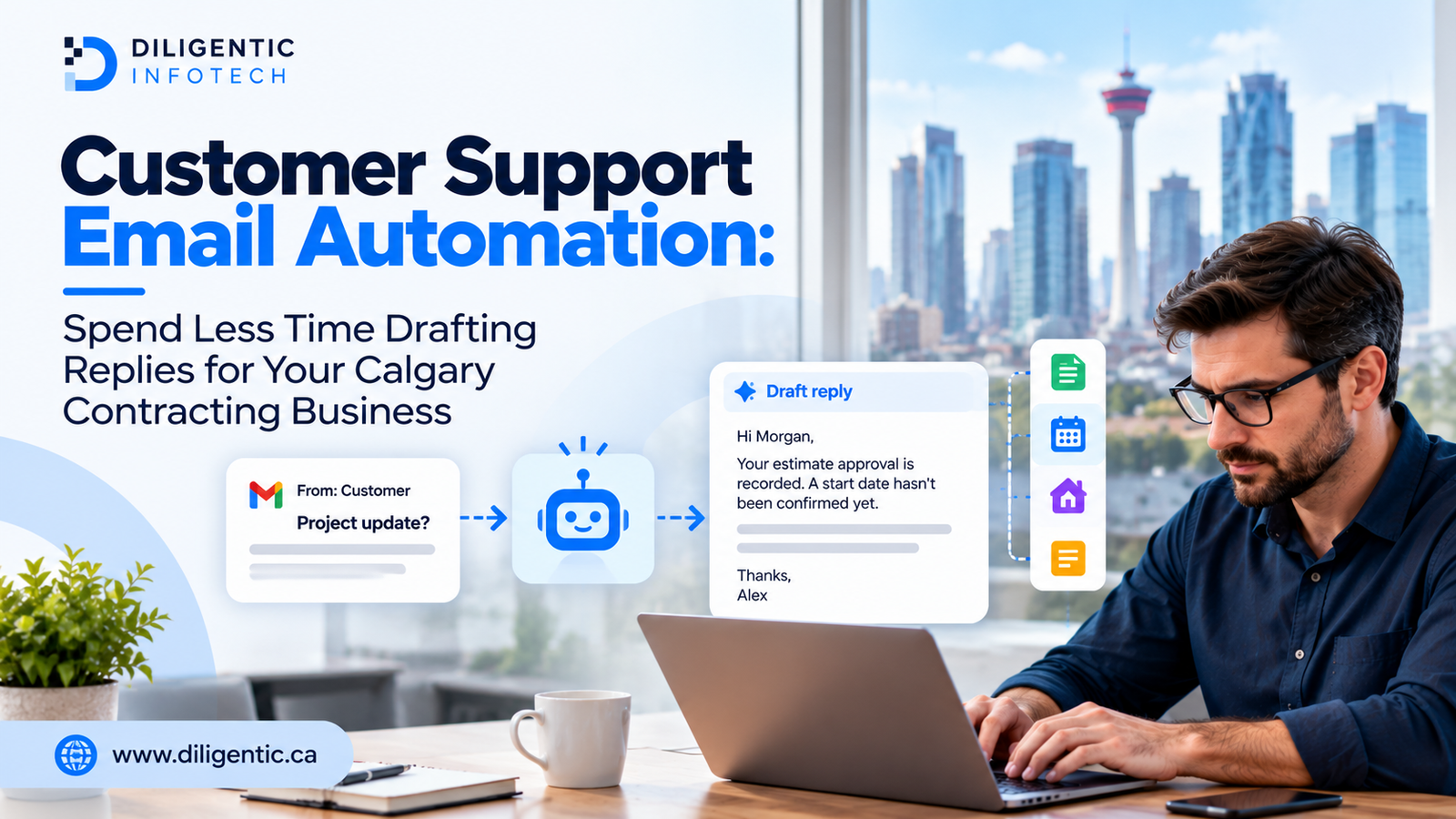
For a Calgary contractor, customer support email automation can turn a booking question and the corresponding job details into a reply ready for an office employee to check. The AI customer support email assistant handles the initial wording; the employee confirms the appointment information, corrects the message, and sends it. Begin with a common request that your office can answer from current records.
First, check whether a saved reply or an existing notification already handles the task. A useful implementation should remove unnecessary work without adding more checking than it saves.
Table of Contents
Why a short email creates so much office work
A homeowner asks when the technician will arrive. Before replying, the administrator opens the booking calendar, checks whether dispatch has assigned a window, and looks for changes in the email thread. A two-sentence answer can require several separate checks.
Three gaps make that work harder: records that are not updated, saved replies that do not cover exceptions, and unclear responsibility for follow-up. A draft assistant depends on those same records and rules. Fix their ownership first, or employees will spend their review time investigating confident but incomplete answers.
Start by naming the source for each fact and the person responsible for keeping it current. For example, dispatch owns the arrival window; the administrator communicates it only after confirmation. Related handoffs are covered in Diligentic’s guide to scheduling and communication for Calgary HVAC companies.
Which customer emails are suitable for draft automation?
Choose requests that employees can answer from a small set of reliable records. A frequent complaint can still need a manager’s decision, so message volume alone should not determine what enters the pilot.
Review a sample of recent messages and group them by the action needed to answer them.
- Appointment confirmations with fixed dates and fields usually belong in the booking tool’s existing notifications. Check that option before adding AI.
- Questions combining a booking update with a specific customer request are better candidates for drafting assistance. The reply must distinguish confirmed details from information still awaiting dispatch.
- Requests for service reports need the correct property, visit and document. The reviewer must also confirm that the recipient is authorized to receive the attachment.
- Estimate inquiries should use the latest approved version and status. Drafting does not authorize a new price or accept a change on the customer’s behalf.
- Warranty questions can draw on approved process guidance. An authorized person still decides coverage and any remedy.
- Complaints and disputed work should reach the responsible employee first. A draft becomes useful after that person determines the response.
For a Calgary contractor accepting selected work in Airdrie, an appointment request also needs a service-address check. The business’s actual coverage and dispatch approval determine what can be offered. This is an illustrative operating scenario, not a claim about any contractor’s service area.
What an AI Customer Support Email Assistant Does
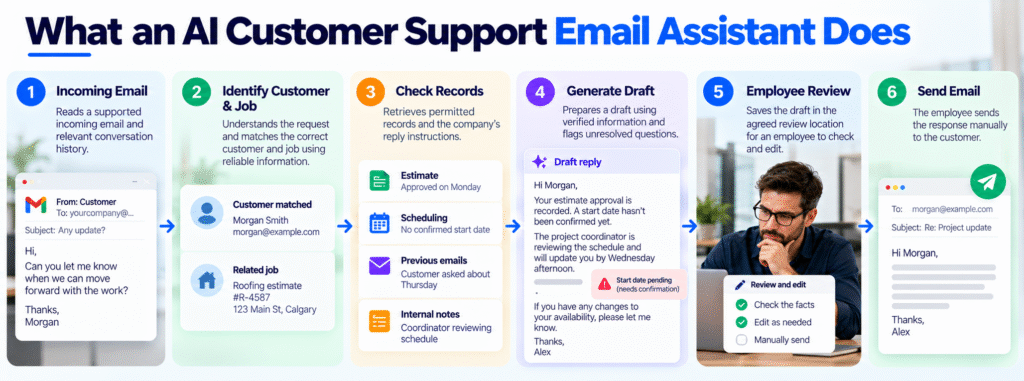
The assistant needs a defined set of reference material: the incoming message, relevant job details, and the company’s instructions for answering that type of question. Those instructions should explain what the reply must include and what requires an employee’s decision.
Diligentic’s AI Customer Support Email Assistant prepares editable drafts and leaves review and sending to an employee. The solution page includes a recorded demonstration, clearly identified as a demo rather than a measured client result.
A proposed contractor setup has six steps:
- Read a supported incoming email and its relevant thread.
- Identify the request and match the correct customer and job.
- Retrieve permitted records and current reply instructions.
- Prepare a draft using verified information and flag unresolved questions.
- Save the draft in the agreed review location.
- Have an employee check, edit, and manually send the response.
Test matching rules, exception alerts, and draft placement in the actual inbox before relying on this proposed setup.
The assistant must not turn a requested date into a booking, approve a revised estimate, or decide warranty coverage. Those actions require separate authority and a verified decision.
Define the workflow before connecting tools
Write down what the pilot may do, where its information comes from, and who is responsible for each reply. A short operating agreement is more useful than a broad instruction to “answer customer emails.”
Choose one inbox and one email category
Specify which messages enter the process and which are excluded. For example, a pilot could handle routine appointment-status questions while routing complaints and requests to reschedule directly to employees.
Test mixed requests too. An email asking for an appointment update and compensation should not be treated as a routine status question in its entirety.
Specify the information and permissions
Identify the record that controls each fact: the scheduling tool for confirmed appointments, the approved estimate for pricing, or the reviewed service report for completed work.
Use reliable identifiers such as the job reference and service address. If multiple jobs match, the workflow should flag the request rather than guess.
If dispatch keeps arrival windows in a scheduling tool, the drafting process needs an approved way to read that appointment record. Diligentic’s system integration service covers connections between existing tools. Check whether the scheduling tool permits the required access, which fields can be retrieved, and how lookup failures reach the office. A connection cannot supply an arrival window that dispatch has never entered.
Set the review location and owner
Decide where drafts appear and how the responsible employee knows one needs attention. Confirm whether the configured inbox supports the intended draft behaviour.
Assign a reviewer and a backup. Define how they claim a message so two employees do not send competing replies. A completed draft is not a completed customer request: someone still needs to check and send it.
Define what happens when drafting cannot continue
Missing records, conflicting dates, restricted information, and unavailable connections need a clear route back to an employee. A failed lookup must never look like a successful status check.
Set a normal manual process the team can use when automation is paused. Keep the inbox usable while a connection or rule is being corrected.
Worked example: drafting an HVAC appointment reply
Hypothetical scenario, not a client result. A Calgary HVAC office is testing drafts for maintenance appointment questions. On Monday morning, a homeowner writes:
Hi, are you still coming to service the furnace tomorrow? What time should I be home?
The booking record confirms Tuesday, but dispatch has not assigned an arrival window. The office’s example policy requires Alex, the administrator, to update the customer by 3 p.m. Monday, even if the window is still pending.
A hurried reply might say:
Yes, you’re booked for tomorrow.
That leaves the customer’s timing question unanswered. Promising a morning visit would create a different problem: the record does not support it.
With access to the booking and approved follow-up instructions, the proposed drafting workflow could produce:
Hi Morgan,
Your furnace maintenance visit is booked for Tuesday. Dispatch is still arranging the arrival window.
I’ll email you by 3 p.m. Calgary time today with an update. If the window hasn’t been assigned by then, I’ll let you know and explain when you can expect the next update.
Thanks,
Alex
Alex checks the service address and latest appointment status, confirms that the promised update is achievable, and sets a dispatch follow-up task with a reminder before sending. The draft’s deadline comes from this hypothetical company’s policy; it is not a suggested promise for every contractor.
If the lookup finds two open jobs, Alex resolves the match before confirming either booking. If dispatch changes the date after the draft is created, Alex revises the message. If there is still no window at 3 p.m., Alex sends the promised update and agrees on the next contact time with dispatch.
Check every draft before sending
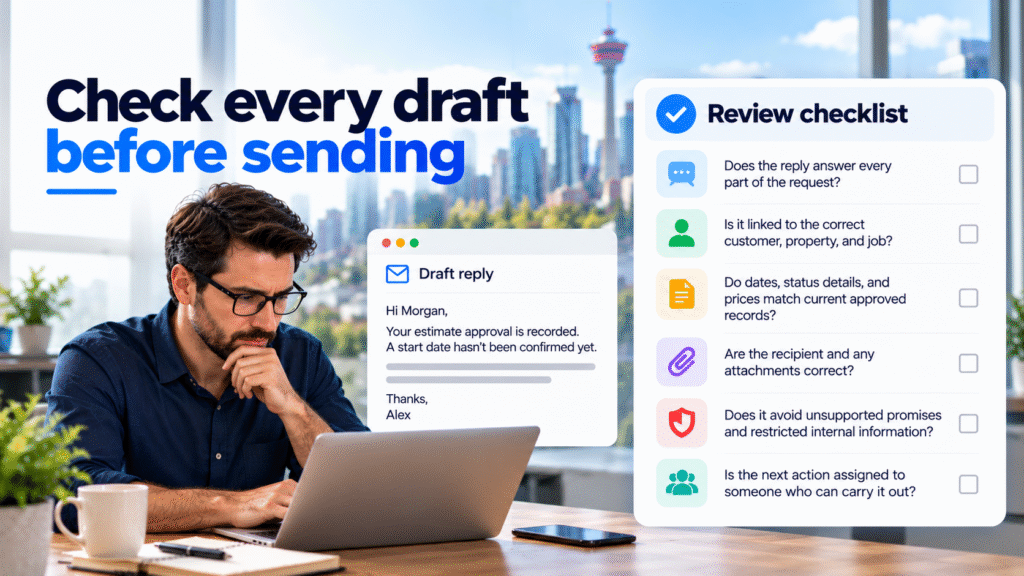
Every draft in Diligentic’s described workflow needs employee review. Sensitive messages may also need a manager, estimator, dispatcher, or qualified technician to make a decision.
Use a brief checklist:
- Does the reply answer every part of the request?
- Is it linked to the correct customer, property, and job?
- Do dates, status details, and prices match current approved records?
- Are the recipient and any attachments correct?
- Does it avoid unsupported promises and restricted internal information?
- Is the next action assigned to someone who can carry it out?
An email promising a callback does not create a task unless task creation has been separately configured. Record the action in the team’s usual task process and confirm an owner.
Keep access limited to what the selected email category requires. Review provider storage, retention, and permissions before using customer messages. Begin testing with sample or appropriately redacted information, and verify that instructions inside an incoming email cannot override the business’s access rules.
Measure the whole process during a pilot
Compare the same email category before and during the pilot. Use consistent definitions so a faster AI-generated draft is not mistaken for less employee work.
Record active employee time spent searching, writing, reviewing, and correcting. Track AI generation time and time waiting for dispatch or another person separately. Also record rejected drafts, missing facts, incorrect job matches, and customer clarification emails.
A simple assessment is:
Average employee minutes returned per email = average manual handling time per email − average AI-assisted handling time per email.
Include searching, writing, checking, corrections, and recording follow-up tasks in each measurement. Decide what counts as an acceptable reply before the pilot: the correct job, answers to all questions, facts matching approved records, no unauthorized commitments, and an assigned next action. Record unavailable source information separately from details the draft gets wrong or leaves out.
Compare messages of similar complexity and disclose how many were reviewed. The difference estimates capacity for that sample; it does not establish cash savings. Actual financial savings require a demonstrated reduction in expenditure.
Include difficult cases before expansion: two open jobs, changed appointments, requests outside scope, an unavailable record, and a message asking for an unauthorized exception.
Pause the pilot and investigate any invented commitment or disclosure of another customer’s information. Expand only when the team can reliably find, verify, and act on drafts without creating extra inbox confusion.
FAQs
Do fixed appointment confirmations need AI?
An existing booking notification or saved reply may be sufficient when the message uses fixed fields. Evaluate AI drafting when the customer’s question requires a tailored response using reliable context.
Where will the AI draft appear?
Draft placement depends on the configured inbox and connections. Agree on the location, reviewer, and notification process, then test them before launch.
What happens when a customer asks for something outside the pilot’s scope?
The workflow should flag or route the message to an employee. Requests for discounts, disputed charges, or technical decisions must not be answered as though approval already exists.
Does Diligentic’s assistant send replies automatically?
No. It prepares editable drafts, and an employee reviews and manually sends the final response.
Choose the first email category before committing to a build
Review recent messages and identify one category with repeated drafting, dependable records, and clear review ownership. Test whether a saved reply handles it first. If employees still spend substantial time assembling tailored answers, evaluate connected drafting against that baseline.
Diligentic can review where these messages arrive, which booking or job records employees consult, and who approves the answer. That assessment helps identify whether updated templates are sufficient or whether a connected drafting workflow deserves a pilot. Book a qualifying call about customer email draft automation. If there is a fit, Ajay arranges an in-person workflow audit in Calgary after qualification.
About the author
Ajay Kumar
Founder and Director
About the author
Ajay Kumar is the founder and director of Diligentic Infotech, a Calgary AI automation company. He has 9+ years of hands-on technical experience and now focuses on helping small and medium businesses connect their existing tools and cut down manual work through practical AI automation. He leads with a clear focus on real, working solutions over one-time demos.

Posted on 27 Oct 2026
Why Calgary Contractors Struggle With Customer Email Management and Finding the Right Information Before Replying
Calgary contractors struggle with customer email management when job details, schedules, and previous conversations sit in separate tools. Before replying, employees must identify the correct job, check the latest information, and resolve gaps or conflicting records. An AI customer support email assistant can help retrieve permitted information and prepare a draft, while an employee verifies the answer and sends it.
Posted on 23 Oct 2026
Inconsistent Customer Email Replies: How Calgary Contractors Can Use an AI Customer Support Email Assistant for More Consistent Communication
A customer emails a Calgary contracting company with a question about a service appointment.
One employee responds with a detailed explanation. Another gives a short answer. A third uses different wording and explains the next step differently.

Posted on 22 Oct 2026
AI Email Assistant in Calgary: How Contractors Can Evaluate Costs, Providers & Implementation
Choosing the right AI email assistant in Calgary starts with understanding how it fits your business. HVAC, plumbing, electrical, and roofing contractors should evaluate customer record access, system integration, human review, and implementation costs before investing.