SHARE

Inconsistent Customer Email Replies: How Calgary Contractors Can Use an AI Customer Support Email Assistant for More Consistent Communication
Calgary contractors can use an AI customer support email assistant to draft replies from approved business guidance and available customer records. Employees check the details, edit the wording, and send the final message. Reliable communication starts with shared facts, clear response standards, and human approval.
For a plumbing office, every appointment reply should distinguish a confirmed booking from a requested visit. A shared response standard makes that distinction clear.
Table of Contents
When different replies become a business problem
Different writing styles are normal. The problem begins when customers receive incomplete information or conflicting commitments.
Consider two employees answering the same appointment question. One confirms the date and explains that dispatch will confirm the arrival window. The other says, “Someone will be there tomorrow morning,” even though no morning window has been assigned.
The second reply creates an expectation the schedule may not support. Someone then has to clarify the promise, contact dispatch, or respond to a frustrated customer.
Look for these differences when reviewing your inbox:
- A confirmed booking and a requested appointment are described as the same thing.
- One reply includes preparation instructions while another leaves them out.
- Team give different explanations of an estimate or warranty process.
- Customers are told to wait without being told who will contact them next.
- Managers repeatedly correct facts or commitments before emails go out.
Start by identifying missing or conflicting information. Tone comes after accuracy.
A Calgary service-area example
Suppose a Calgary plumbing business also accepts selected jobs in Airdrie. This is a hypothetical service area. If a customer requests an Airdrie appointment, the reply should reflect the company’s actual coverage and dispatch approval. A Calgary booking template must not imply that a requested visit outside the city is confirmed. Check the service address and any approved travel-charge policy before drafting.
Why customer email replies become inconsistent
Inconsistent replies often begin with the process behind the email. Improving the writing alone leaves those causes in place.
Customer information is scattered
An administrator might see the booking calendar while a coordinator relies on an older email thread. If the job status changed, they could give different answers while both believe they are using the right information.
Decide which tool holds the current appointment status. Make it clear who updates that record and how team check it before replying.
Templates lack rules for exceptions
A saved reply might say, “Your appointment is confirmed,” but provide no instruction for a request awaiting dispatcher approval. Team then improvise around the missing rule.
Create separate guidance for requested, confirmed, rescheduled, and cancelled appointments. Remove outdated versions so employees have one current reference.
Nobody owns the next step
An employee can write a courteous reply that still leaves the customer unsure what happens next. “The team will get back to you” does little when nobody has been assigned the follow-up.
Define who handles each exception and how the request reaches that person. An AI draft cannot resolve an ownership gap by sounding more confident.
Set a response standard using your current tools
Before adding AI, write a short checklist for one common email type. Use your shared inbox, existing templates, and current job records to test it.
For appointment questions, the reviewer should check:
- Does the reply answer the customer’s actual question?
- Does the appointment status match the current record?
- Is any arrival window confirmed and approved for sharing?
- Does the customer know the next step and who owns it?
- Have unsupported promises and unnecessary personal details been removed?
Keep the checklist beside the saved reply. Assign someone to update it when the booking process changes.
If this resolves the problem and team handle only a few routine messages, keep using it. AI becomes worth evaluating when employees repeatedly search for context and adapt similar replies despite having clear guidance.
How an AI Customer Support Email Assistant Improves Replies
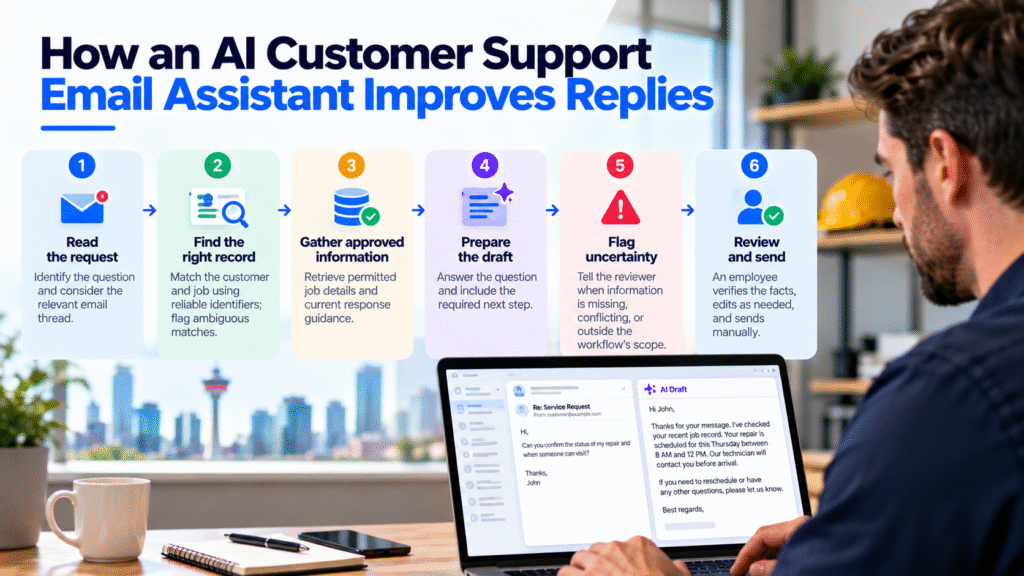
An AI customer support email assistant prepares a draft using the incoming message and the approved information made available to its workflow. Its usefulness depends on the quality and availability of those inputs.
Diligentic’s AI Customer Support Email Assistant prepares editable responses and keeps final review and sending with the employee. Its solution page includes a recorded demonstration, identified as a demo rather than a client case study.
For a contractor, an implementation should specify the following steps:
| Step | Required behaviour |
|---|---|
| Read the request | Identify the question and consider the relevant email thread. |
| Find the right record | Match the customer and job using reliable identifiers; flag ambiguous matches. |
| Gather approved information | Retrieve permitted job details and current response guidance. |
| Prepare the draft | Answer the question and include the required next step. |
| Flag uncertainty | Tell the reviewer when information is missing, conflicting, or outside the workflow’s scope. |
| Review and send | An employee verifies the facts, edits as needed, and sends manually. |
Before your team uses this workflow, check that it retrieves the correct customer and job records, flags ambiguous matches, and handles missing information without inventing an answer.
Worked example: a plumbing appointment question
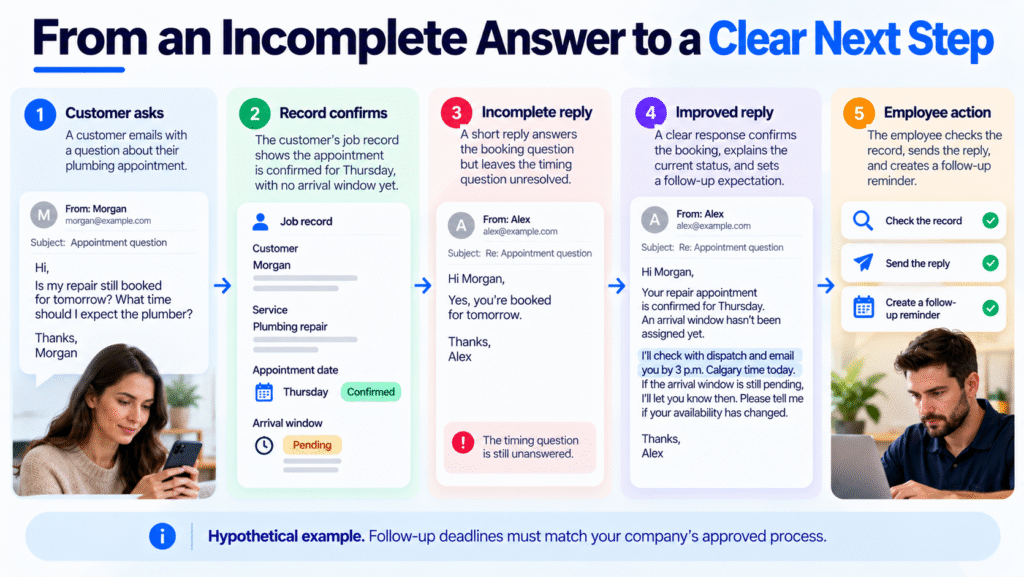
Hypothetical scenario, not a client result. This example connects email drafting with the dispatch handoffs covered on Diligentic’s Calgary plumbing workflow page. A customer asks:
Hi, is my repair still booked for tomorrow? What time should I expect the plumber?
It is Wednesday morning. The booking is confirmed for Thursday, with no arrival window assigned. This example company’s policy requires the administrator to update the customer by 3 p.m. Calgary time, even if dispatch has no window yet.
An incomplete reply might say:
Yes, you’re booked for tomorrow. Thanks.
That answers the booking question but leaves the timing question unresolved. A more serious error would be promising a morning visit without evidence.
Using the approved record and response standard, the assistant could prepare:
Hi Morgan,
Your repair appointment is confirmed for Thursday. An arrival window hasn’t been assigned yet.
I’ll check with dispatch and email you by 3 p.m. Calgary time today. If the arrival window is still pending, I’ll let you know then. Please tell me if your availability has changed.
Thanks,
Alex
Before sending, Alex checks that the appointment is still confirmed and accepts responsibility for the follow-up. Alex records the dispatch task and a reminder before the 3 p.m. deadline in the team’s usual task tool. Mentioning a follow-up in an email does not create an assigned task unless that action is separately configured.
If dispatch has no window by the deadline, Alex sends the update and tells the customer the next contact time agreed with dispatch. Any commitment must follow the company’s process and Alex’s ability to deliver it.
If the customer has two open repair jobs, the workflow should flag the match for review. If the record cannot be retrieved, the draft should avoid confirming a booking and ask the employee to check it.
Decide whether templates or AI fit the work
Use the simplest approach that addresses the problem. A fixed message does not need an AI drafting step merely because it arrives by email.
| Situation | Practical starting point |
|---|---|
| A standard confirmation with fixed fields | A saved template or existing booking notification |
| Team use different terms for the same status | Shared terminology and updated templates |
| Replies combine a customer question, job context, and approved guidance | Evaluate connected AI drafting with human review |
| Job records are incomplete or outdated | Fix record ownership and updates first |
| A complaint requires a refund or warranty decision | Route it to an authorized person; drafting follows the decision |
The distinction matters across trades. Electrical inquiries need to distinguish preliminary information from approved quotes. Roofing replies need accurate inspection status. For wider scheduling and communication handoffs, see AI workflow guidance for Calgary HVAC companies.
For these proposed uses, system integration connects tools so the drafting process can retrieve required records. Feasibility depends on available connections, permissions, and data quality.
Put controls around customer information and exceptions
Give the workflow access only to the records needed for its assigned task. Decide who can view the inbox, retrieved information, and saved drafts before testing with customer messages.
Review how the selected providers handle storage, retention, and access. Keep payment details and unrelated sensitive information out of drafting inputs unless there is a justified, approved need. Use sample or appropriately redacted messages during early testing.
Treat incoming emails as customer requests. Instructions inside an email must never override the business’s approved rules or authorize access to other customers’ records. Include that behaviour in testing.
Keep these decisions with authorized Team:
- Approving discounts, refunds, or pricing exceptions.
- Deciding warranty coverage or resolving disputes.
- Giving technical advice outside approved guidance.
- Committing to an unconfirmed appointment or completion date.
Name a reviewer and a backup. If a connection fails or guidance becomes outdated, team need a clear way to pause drafting and return to the normal inbox process.
Pilot one email type and measure the result
Start with routine appointment-status questions where current records are dependable. Test confirmed bookings, changed dates, missing arrival windows, ambiguous customer matches, and unavailable records before expanding.
Compare the same email type using one checklist for manual replies and the AI pilot. Measure active team preparation and review time separately. Record AI generation time separately from employee effort, and exclude waiting for dispatch.
Use one row per message in a shared sheet. The following row illustrates the format; it is not a measured result.
| Email type | Required detail missing | Factual correction | Team preparation | Team review | Follow-up owner |
|---|---|---|---|---|---|
| Appointment status | Arrival window unavailable in record | None after checking booking | Record elapsed minutes | Record elapsed minutes | Office administrator |
Separate gaps in the job record from mistakes in the draft. Also record customer clarification emails and why drafts were rejected, so the team can fix the record, instructions, or drafting step.
Count review time in the assessment. Faster drafting has limited value if employees spend longer checking and correcting each message. Time returned to team is additional capacity; actual cash savings require a separate, demonstrated reduction in expenditure.
Agree on acceptance criteria before the pilot. Unsupported commitments, cross-customer information, or repeated record-matching errors are reasons to stop and correct the workflow.
FAQs
Can an AI email assistant use a contractor’s existing inbox?
A drafting workflow can be designed around a supported inbox and available connections. Confirm permissions, draft placement, and how team will review messages before approving the setup.
What happens when appointment information is missing?
The workflow should flag the missing information for an employee and avoid inventing a time or status. The employee checks the current booking record or contacts dispatch before confirming details.
Does a contractor need a CRM before using AI email drafting?
A dedicated CRM is not always necessary. The workflow still needs accessible, reliable customer records, clear matching rules, and someone responsible for keeping the information current.
How can a contractor check whether replies are becoming more consistent?
Compare replies against the same factual checklist before and during a pilot. Track required details, unsupported promises, corrections, and clarification emails instead of judging consistency only by tone.
Start with the replies your team keeps correcting
Review a sample of recent customer emails and identify the information team repeatedly miss or rewrite. Establish a response standard for that email type, then test whether connected drafting improves the process without adding more checking work.
Diligentic can assess the inbox process, available records, and approval steps before recommending automation. To discuss inconsistent customer replies, book a qualifying call about your email workflow. If there is a fit, Ajay arranges an in-person workflow audit in Calgary after qualification.
About the author
Ajay Kumar
Founder and Director
About the author
Ajay Kumar is the founder and director of Diligentic Infotech, a Calgary AI automation company. He has 9+ years of hands-on technical experience and now focuses on helping small and medium businesses connect their existing tools and cut down manual work through practical AI automation. He leads with a clear focus on real, working solutions over one-time demos.

Posted on 2 Sep 2026
How Storm Lead Surges Overwhelm Calgary Roofing Companies—and How AI Lead Automation Helps in 2026
A major hailstorm can send a sudden wave of roofing enquiries into a Calgary company within hours. The challenge is not only answering calls. It is capturing every lead, collecting the right information, identifying urgent cases, assigning the next step, and keeping records updated while the team is already busy.

Posted on 16 Sep 2026
AI Receptionist For Contractors in Calgary: How Missed Calls Can Lead to Lost Business in 2026
Calgary contractors can lose customer opportunities when calls arrive while office staff are busy, unavailable, or already dealing with other work. An AI Receptionist For Contractors can answer configured calls, collect predefined caller and job information, handle approved routine enquiries, and pass that information into the next workflow based on the contractor’s setup.

Posted on 23 Sep 2026
Why Calgary Contractors Struggle With Manual Call Intake and How an AI Receptionist For Contractors Can Improve Customer Information Collection
For many Calgary contractors, the bigger operational challenge starts during the conversation. An employee needs to collect the right customer information, record it clearly, and make sure those details reach the right person or business system.