SHARE

AI Plumbing Dispatch Automation for Calgary Teams Facing Daily Schedule Changes

A plumber’s day rarely follows the original calendar. One visit takes longer, a customer changes availability, or an urgent call needs attention. Dispatch must then choose a suitable technician and update everyone affected. When job details sit in separate tools, that decision takes extra calls and checking.
AI plumbing dispatch automation can help organize incoming requests and field notes. Scheduling rules can identify conflicts, and connected software can carry approved changes to the calendar, technician and customer. Dispatchers still decide how to handle urgent work and changes to promised appointments.
Table of Contents
Why plumbing jobs are difficult to reschedule
A free calendar slot tells only part of the story. Before assigning a call, dispatch may need to confirm the technician’s skills, equipment, current job status and travel time.
Those details may sit in a booking form, a scheduling system and messages from the field. If a visit runs late, the office has to reconcile them before offering the next customer a dependable arrival window.
A missed update can also spread. A technician may follow an old assignment while a customer waits for news about a revised time. The issue is not simply how fast someone can edit a calendar; it is whether everyone receives the same approved plan.
A Calgary plumbing call that changes the afternoon
Consider a hypothetical Calgary plumbing team with technicians in the northwest, downtown and southeast.
A downtown repair needs another hour. The technician’s afternoon customer has already been given an arrival window. At the same time, someone in the southeast calls about an active leak.
The technician closest to the new request is finishing another job. A technician with an opening may be farther away or may lack the equipment needed. The dispatcher must learn more about the leak, check current assignments and decide which appointment, if any, should move. Choosing whoever appears closest on a map would leave out important details.
A shared dispatch view would show the new request beside current appointments and technician updates. Where reliable skill and availability records exist, scheduling rules could identify conflicts and display possible assignments. The dispatcher would assess the leak, choose a response and approve any change to a confirmed visit before messages go out.
This is an illustrative workflow. The steps a company can use depend on its software, records and dispatch rules.
From plumbing request to confirmed assignment
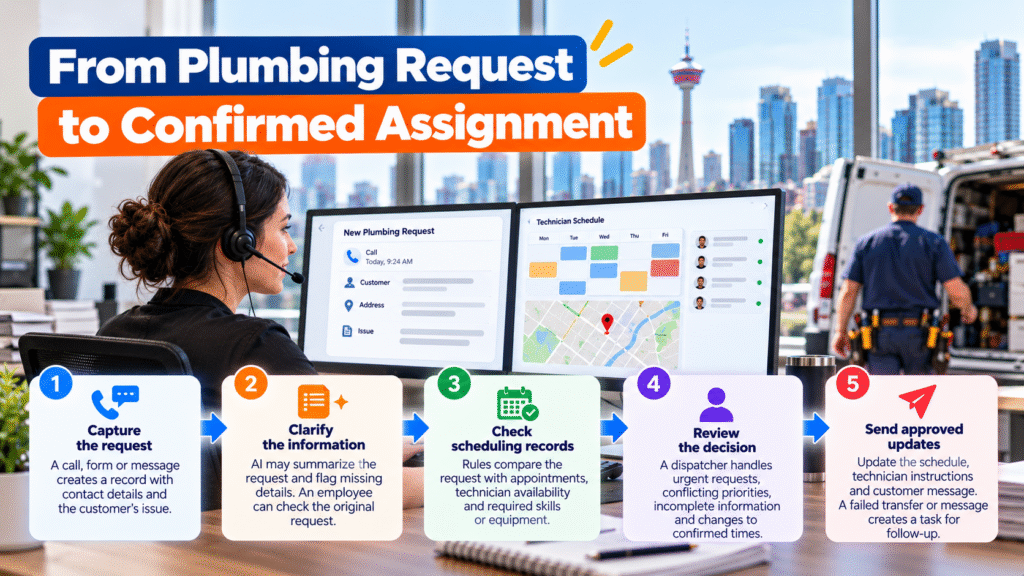
A dispatch workflow is easier to understand when each step has a clear purpose:
- Capture the request. A call, form or message creates a record with contact details and the customer’s description of the problem.
- Clarify the information. AI may summarize a call transcript or flag missing details, such as an unclear address or the absence of a callback number. An employee can check the original request.
- Check scheduling records. Rules compare the request with recorded appointments, technician availability and any required skills or equipment.
- Review the decision. A dispatcher handles urgent requests, conflicting priorities, incomplete information and changes to confirmed times.
- Send approved updates. Once the decision is recorded, the schedule, technician instructions and customer message can be updated. A failed transfer or message should produce a task for follow-up.
AI helps most with information that arrives as spoken or written language. Checking calendar conflicts and sending an approved confirmation generally rely on scheduling rules and ordinary automation.
Give each tool a clear job
Plumbing dispatch software may hold the schedule, while a customer management system holds contact details and a field app holds technician updates. Connecting them can spare office staff from copying the same information, but the company first needs to decide which tool is the source for each record.
For example, a customer may correct their address during a call. The team needs a rule for where that correction is saved and how it reaches the technician. If two systems disagree, the workflow should flag the difference instead of silently choosing one.
The same principle applies when a technician reports a delay. The update should reach dispatch promptly, but it should not automatically promise a new arrival time unless the company has approved that action.
Diligentic’s plumbing industry page describes related handoffs across calls, dispatch and billing. For this workflow, the priority is keeping scheduling information current and showing dispatchers which decisions need attention.
What AI can help with in plumbing dispatch
AI assistance is useful when someone has to interpret a request or note before the next step is clear. It might:
- Summarize a customer’s description of a plumbing issue for the dispatcher.
- Extract an address or preferred appointment time from a message.
- Flag a technician note that does not explain whether a return visit needs parts.
- Prepare a draft customer update for an employee to approve.
It should not fill in missing facts as though they were confirmed. A message such as “water coming through the ceiling” may need prompt human attention and more questions; a model’s summary is not a diagnosis of the cause or a final urgency decision.
Why dispatchers still need control
A scheduling suggestion is only as good as the records behind it. A technician shown as available may still be completing work. A profile may omit a skill or piece of equipment. Travel information may not reflect the actual plan for that day.
Before allowing routine assignments, a plumbing company should define who can change a confirmed time, which jobs need particular skills, how urgent calls are escalated and what happens when required information is missing.
Depending on the software and approved rules, automation may create a straightforward assignment or offer options for dispatcher review. Exceptions need a named person who can resolve them.
Measure the dispatch problem you want to fix

Record a starting point before introducing a new workflow. Then compare similar periods and note unusual changes in staffing or call volume.
| Measure | Question it answers |
|---|---|
| Request-to-confirmation time | How long do customers wait for a confirmed appointment? |
| Dispatcher time per assignment | How much checking and coordination does each booking take? |
| Manual calls after a schedule change | How often must the office chase an update? |
| Technician waiting time | Are technicians waiting for their next assignment or instructions? |
| Late customer updates | Are customers told when a confirmed plan changes? |
| Failed or corrected updates | Are the connected records dependable? |
Keep the results separate. Fewer dispatcher calls do not automatically mean more jobs completed, and quicker confirmations are only valuable if the team can meet them.
Start with one recurring schedule change
A practical first test is a technician reporting that a job will run late. Map where that report arrives today, who checks the next appointment, who approves a revised plan and who contacts the customer.
Then test the workflow with a normal delay, a missing technician status, a customer who cannot accept a new time and a failed message. The dispatcher should be able to see each exception and take over.
This will show whether the company needs clearer rules, a connection between its current tools or AI assistance with hard-to-read updates. Diligentic’s process automation service covers assessing and building these kinds of workflows around existing systems.
Frequently asked questions
What is AI plumbing dispatch automation?
It uses AI assistance, scheduling rules and connected systems to help a plumbing team handle requests and schedule changes. AI can organize unclear information; dispatchers make decisions that need judgment or approval.
Does AI choose which technician goes to a job?
A system may suggest technicians based on the records and rules available. Some software can make defined routine assignments. Urgent requests, missing information and changes to customer commitments may still require dispatcher review.
Does a company need to replace its dispatch software?
Not necessarily. First check what the current software can record, share and update. The main problem may be a missing connection or an unclear process rather than the scheduling tool itself.
Can automation reduce technician waiting time?
It may help if waiting is caused by delayed assignments or missing instructions. Track waiting time before and after the change to determine whether it helps your team.
What should a Calgary plumbing company automate first?
Choose a frequent handoff with clear steps, such as appointment confirmations or late-job updates. Test how it handles missing data and failed transfers before expanding it.
Make the next schedule change easier to manage
Plumbing work will continue to disrupt a planned day. Dispatchers can respond more confidently when current job details are easy to find, scheduling conflicts are visible and approved updates reach technicians and customers promptly.
Diligentic helps Calgary plumbing companies examine these handoffs and connect workflows around the tools they already use. Book a discovery call to discuss a dispatch delay your team handles repeatedly.
About the author
Ajay Kumar
Founder and Director
About the author
Ajay Kumar is the founder and director of Diligentic Infotech, a Calgary AI automation company. He has 9+ years of hands-on technical experience and now focuses on helping small and medium businesses connect their existing tools and cut down manual work through practical AI automation. He leads with a clear focus on real, working solutions over one-time demos.
Posted on 19 Nov 2026

Posted on 16 Nov 2026
Plumbing Data Entry Automation for Calgary Companies: Which Job Details Should Move?
A customer’s service address is entered when they book a plumbing visit. The office copies it into the schedule. After the job, someone enters the technician’s labour and materials into billing software. The same job has moved forward, but its details have been typed more than once.

Posted on 27 Jul 2026
How Plumbing Companies Calgary Lose Revenue Due to Disconnected Systems—and How AI Automation Fixes It in 2026
Plumbing companies often lose revenue because job information doesn’t move smoothly from scheduling and field service systems into invoicing and accounting.
A technician may complete the work, but missing notes, unrecorded materials, delayed approvals, or disconnected customer updates can prevent the business from billing the full value of the job.