SHARE

How Plumbing Companies Calgary Lose Revenue Due to Disconnected Systems—and How AI Automation Fixes It in 2026
Plumbing companies often lose revenue because job information doesn’t move smoothly from scheduling and field service systems into invoicing and accounting.
A technician may complete the work, but missing notes, unrecorded materials, delayed approvals, or disconnected customer updates can prevent the business from billing the full value of the job.
The solution is not always another software platform. In many cases, plumbing companies Calgary need better connections between the tools they already use.
This article explains where revenue leakage occurs, how workflow automation can reduce it, and what Calgary plumbing companies should review before investing in AI or system integration.
Table of Contents
What Is Revenue Leakage in a Plumbing Business?
Revenue leakage occurs when a company fails to invoice or collect the full value of completed, approved, billable work.
Common examples include:
- Labour hours that are not recorded
- Materials that are used but not added to the job
- Additional work completed without documented approval
- Finished jobs that remain uninvoiced
- Invoices delayed because required information is missing
- Overdue invoices that receive no follow-up
- Discounts or adjustments applied without proper review
Incorrect job attribution is a related problem. It may not immediately reduce collected revenue, but it can distort job-cost reporting and make the source of losses harder to identify.
For plumbing companies, preventable revenue risk often appears during the handoffs between employees and systems.
Where Plumbing Workflows Commonly Break Down
A typical plumbing job may involve several stages:
- A customer submits a service request.
- Office staff creates the job.
- A dispatcher assigns a technician.
- The technician completes the work.
- Labour, materials, photos, and notes are recorded.
- Additional work is reviewed and approved.
- An invoice is created.
- Payment is collected and matched to the job.
Revenue can be delayed or lost when these stages rely on manual re-entry, informal messages, or disconnected applications.
Missing Field Information
A technician may mark a job complete without entering all required labour hours, materials, photos, or customer approvals.
Office staff must then contact the technician, search through messages, or delay the invoice.
Unrecorded Scope Changes
A technician may discover additional work after arriving at the property. If the new scope and price are not documented and approved, the company may be unable to bill for the extra work without creating a customer dispute.
Duplicate Data Entry
Employees may enter the same customer, job, or invoice information into multiple systems.
Every manual transfer creates another opportunity for:
- Typing errors
- Missing fields
- Duplicate records
- Incorrect prices
- Delayed updates
Customer Updates Outside the Job Record
Appointment changes, job instructions, and approvals may be sent through text messages, email, or phone calls without being added to the main job record.
This can contribute to missed visits, repeat work, billing delays, or disputes about what the customer approved.
Weak Invoice Follow-Up
An invoice may be sent correctly but remain unpaid because the company has no consistent reminder process.
QuickBooks Online, for example, allows businesses to configure automatic invoice reminders before or after a payment due date. The feature can support follow-up, but the company must still decide when reminders should be sent and how overdue accounts should be escalated.
Why Disconnected Software Creates More Work
Many plumbing businesses already use several tools for:
- Customer relationship management
- Scheduling
- Dispatch
- Field-service management
- Estimates and approvals
- Invoicing
- Accounting
- Payment processing
- Internal communication
The problem is not necessarily the number of tools. The problem is whether those tools share accurate information.
When systems are disconnected, employees must repeatedly switch applications, copy records, check statuses, and confirm whether another person completed the next step.
Research published by Harvard Business Review examined 137 digital workers across 20 teams. The average participant switched between applications and websites nearly 1,200 times per day, and the resulting reorientation consumed just under four hours per week.
The research did not examine plumbing companies specifically, but it illustrates the operational cost of repeatedly asking employees to move between disconnected systems.
A plumbing office may experience similar friction when staff must compare a field-service platform, accounting software, email, spreadsheets, and text messages before they can issue one accurate invoice.
How AI Automation Connects Plumbing Business Systems to Stop Revenue Loss
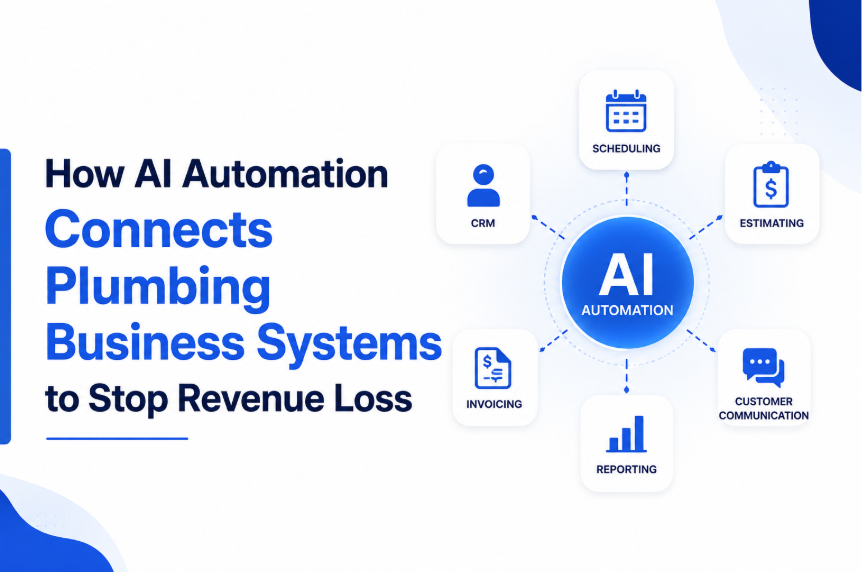
Workflow integration allows information created in one system to trigger an appropriate action in another system.
For example:
- A technician marks a job complete.
- The workflow checks whether required fields are present.
- Missing information is flagged for correction.
- Approved job details are transferred to the invoicing process.
- The invoice is connected to the correct customer and job identifier.
- Payment status is returned to the operational system.
- Overdue invoices enter a reminder or review process.
This type of workflow depends on the capabilities of the software involved.
Applications may exchange information through:
- Native integrations
- Application programming interfaces
- Webhooks
- Automation platforms such as Make.com or Zapier
- Structured data exports
- Custom code
Not every product can be integrated in the same way. Vendor restrictions, permissions, available connectors, and data quality all affect what is possible.
Workflow Automation and AI Are Not the Same
Many useful plumbing workflows do not require artificial intelligence.
Standard workflow automation can:
- Move structured information between systems
- Apply predefined business rules
- Assign tasks
- Send notifications
- Check required fields
- Route approvals
- Create follow-up activities
- Update record statuses
These functions operate according to rules configured by the business.
AI may be useful when the workflow needs to interpret less-structured information.
Examples include:
- Classifying incoming customer requests
- Extracting details from technician notes
- Summarizing job histories
- Sorting emails by urgency
- Identifying unusual records for human review
- Drafting internal summaries
- Suggesting a next action based on available information
AI should not be treated as a replacement for pricing policies, customer authorization, accounting controls, or employee judgment.
The strongest workflow usually combines reliable rule-based automation with human review at important decision points.
A Practical Plumbing Job-to-Payment Workflow
A connected workflow should reduce manual effort without removing necessary controls.
Step 1: Create One Reliable Job Record
The workflow begins with a central record containing:
- Customer details
- Service address
- Reported issue
- Appointment time
- Assigned technician
- Estimate or pricing information
- Relevant customer instructions
Other systems should refer to the same customer and job identifiers wherever possible.
Step 2: Define Required Completion Information
Before a job can move to invoicing, the company should define what the technician must submit.
This may include:
- Arrival and completion times
- Labour hours
- Materials used
- Work performed
- Photos
- Customer signature
- Additional work
- Payment information
- Follow-up recommendations
Once those requirements are configured, the workflow can flag incomplete records.
Step 3: Route Scope Changes for Approval
When a technician records work outside the approved scope, the workflow can send the supporting notes, price, and authorization request to the appropriate person.
Depending on the company’s process, approval may be required from:
- The customer
- A service manager
- An office administrator
- A property manager
- Another authorized decision-maker
Billing should proceed only after the required approval has been documented.
Step 4: Transfer Approved Billing Information
Where the field-service and accounting systems support compatible integrations, approved invoice data can be transferred without manual re-entry.
The transfer may include:
- Customer information
- Labour charges
- Material charges
- Taxes
- Discounts
- Purchase order numbers
- Job identifiers
- Payment terms
An employee should review exceptions instead of rebuilding every invoice from the beginning.
Step 5: Track Payment Status
When a payment is recorded, the operational job record should be updated where the systems support that connection.
This gives authorized staff a clearer view of whether a job is:
- Completed
- Ready to invoice
- Invoiced
- Partially paid
- Paid
- Overdue
- Under review
Step 6: Escalate Exceptions
Automation should bring unusual or incomplete records to an employee’s attention.
Examples include:
- A completed job with no invoice
- An invoice with no customer email
- Materials recorded without a price
- Additional work without approval
- An overdue balance above a defined threshold
- Duplicate customer records
- A payment that cannot be matched to a job
This approach allows employees to focus on exceptions instead of manually checking every normal transaction.
A Workflow Diagnostic Checklist for Plumbing Companies Calgary
Before buying another platform, review one recent job from the first customer contact to final payment.
Ask the following questions.
Customer Intake
- Where is customer information first recorded?
- Is the same information entered again elsewhere?
- Can duplicate customer records be created?
- Are urgent jobs identified consistently?
Scheduling and Dispatch
- Does the dispatcher see the latest customer instructions?
- Are appointment changes recorded in the main job record?
- Can technicians access the information they need before arrival?
Field Completion
- Which fields must be completed before closing a job?
- Can a technician close a job without entering materials or labour?
- Are photos and customer approvals stored with the job?
- How are scope changes documented?
Invoicing
- Who decides that a job is ready to invoice?
- Does accounting re-enter information manually?
- What prevents incomplete jobs from reaching billing?
- How are discounts and adjustments approved?
Payment Collection
- Are reminders sent consistently?
- Who reviews overdue invoices?
- Can payment status be matched to the correct job?
- Is there a process for disputed or partially paid invoices?
Reporting
- Can management identify completed jobs that have not been invoiced?
- Can the company compare estimated and actual labour?
- Can it identify missing material charges?
- Are reports based on complete and consistently structured data?
The purpose of this review is to find the exact handoff where information becomes delayed, incomplete, or unreliable.
How Diligentic Infotech Supports Plumbing Workflow Improvement
Diligentic Infotech helps businesses examine existing workflows, connect tools, and automate repeatable processes.
AI Workflow Assessment
Diligentic Infotech’s AI Workflow Assessment maps the current workflow, identifies steps that may be suitable for automation, and produces a prioritized roadmap before implementation begins.
For a plumbing company, the assessment may examine how information moves between:
- Customer intake
- Dispatch
- Field service
- Approvals
- Invoicing
- Accounting
- Payment follow-up
- Management reporting
Tool Integration and Sync
Where existing applications provide suitable connectors, APIs, webhooks, or data exports, Diligentic Infotech’s Tool Integration and Sync service can connect operational and administrative systems.
The goal is to reduce duplicate entry and improve the consistency of customer, job, invoice, and payment information.
Business Process Automation
Diligentic Infotech’s Business Process Automation service focuses on repeatable workflows such as:
- Job-completion checks
- Approval routing
- Invoice preparation
- Internal notifications
- Payment reminders
- Exception reporting
- Record updates between systems
The appropriate solution depends on the company’s existing tools, permissions, data structure, and operating policies. Diligentic Infotech reports delivering more than 100 projects for more than 70 businesses.
Start With One Workflow
A plumbing company does not need to automate every process at once.
Start with one job and trace it through the complete workflow:
- Customer request
- Scheduling
- Technician assignment
- Work completion
- Approval
- Invoicing
- Payment
- Reporting
Document every point where an employee must re-enter information, search for missing details, confirm a status manually, or contact another person before proceeding.
That review will show whether the business needs:
- Better process rules
- Improved staff training
- Cleaner data
- A system integration
- Standard workflow automation
- AI-assisted processing
- A combination of these improvements
For a closer look at plumbing-specific automation opportunities, read Diligentic Infotech’s guide to AI workflow automation for plumbing companies.
FAQ’s
What is plumbing workflow automation?
Plumbing workflow automation uses configured rules and connected systems to complete repeatable administrative tasks. Examples include assigning follow-up tasks, checking required job fields, routing approvals, preparing invoice data, and sending payment reminders.
Does workflow automation require AI?
No. Many valuable workflows use standard triggers, actions, and business rules. AI is more appropriate when the process involves unstructured information, classification, summarization, or recommendations.
Can every plumbing software platform be connected?
No. Integration depends on whether each platform provides suitable native connectors, APIs, webhooks, exports, and user permissions. Some systems may require custom development, while others may offer limited integration options.
Will automation prevent all revenue leakage?
No. Automation can reduce preventable errors, missing information, and delays, but it cannot replace sound pricing, customer authorization, accounting controls, employee training, or management review.
What should a plumbing company automate first?
Start with a frequent process that creates measurable administrative work or billing delays. Job-completion validation, approval routing, invoice preparation, and overdue-payment follow-up are common starting points.
About the author
Ajay Kumar
Founder and Director
About the author
Ajay Kumar is the founder and director of Diligentic Infotech, a Calgary AI automation company. He has 9+ years of hands-on technical experience and now focuses on helping small and medium businesses connect their existing tools and cut down manual work through practical AI automation. He leads with a clear focus on real, working solutions over one-time demos.

Posted on 21 May 2026
How Field Service Management Software Improves HVAC, Plumbing, and Electrical Operations
Field service management software connects the work that happens in the office with the work technicians complete in the field. It gives HVAC, plumbing, and electrical businesses one reliable process for receiving a service request, assigning the right person, recording job details, invoicing the customer, and reviewing performance.

Posted on 8 Jun 2026
How Plumbing Software Helps Calgary Contractors Streamline Dispatch, Jobs, and Invoicing in 2026
Many plumbing contractors reach a point where disconnected systems, spreadsheets, manual scheduling, and repeated data entry start slowing down operations. Custom plumbing software helps centralize dispatching, technician management, invoicing, reporting, customer communication, and workflow automation into one connected system. This improves operational visibility, reduces administrative workload, supports AI-driven automation, and helps contractors scale without workflow bottlenecks.
Posted on 6 Jul 2026
Why Calgary Plumbing Companies Struggle with Plumbing Job Management Software and Still Lose Revenue in 2026: How AI Automation Fixes It
Calgary plumbing companies are booking more jobs, managing more technicians, and handling more customer requests. But more work does not always mean more profit. Many owners still deal with late invoices, slow payments, missed follow-ups, scheduling confusion, and an overloaded office.