SHARE

Customer Email Management for Calgary Contractors: Why Customer Requests Get Lost in Busy Inboxes
Customer email management for contractors means making every customer request visible, assigned, and ready for the right next action. A busy inbox becomes a problem when your team can read a message yet still lose track of the work it requires.
For Calgary contractors, office staff often balance calls, scheduling, dispatching, estimates, invoices, technician updates, and customer questions at the same time. An email about a rescheduled appointment or an unanswered estimate can sit in the inbox while everyone assumes somebody else is handling it.
The first step is to understand where requests disappear in the current workflow. Only then can you decide whether clearer process rules, inbox changes, or AI assistance are appropriate.
Discuss your customer email workflow with Diligentic if your team is already chasing customer requests across a shared inbox. The link starts a qualifying conversation; if there is a fit, Diligentic can arrange a workflow audit.
Table of Contents
An opened email can still be an outstanding request
Reading a message is different from completing the work inside it.
Consider an HVAC customer asking to move a maintenance appointment. An office employee reads the email, then receives a phone call about an urgent service request. The rescheduling task may not have an owner, status, or planned follow-up.
Later, another employee sees the same thread. They cannot tell whether the request is being handled, whether availability was checked, or whether the customer received an answer.
That is the operational gap a contractor needs to address: receiving a request, recognizing the action it needs, and showing who is responsible for the next step.
Why customer email management becomes hard in contractor inboxes
A single shared inbox can combine several kinds of work that need different decisions.
| Message type | Example request | What may need to happen next |
|---|---|---|
| New enquiry | A homeowner asks for a service visit | Collect details or route the enquiry |
| Scheduling | A customer asks to move an appointment | Check availability and reply |
| Estimate | A prospect asks about a submitted quote | Confirm status or assign follow-up |
| Billing | A customer requests an invoice copy | Locate the correct record and respond |
| Job update | A customer asks when a technician will arrive | Check approved job information |
| Service concern | A customer reports a problem | Route the issue to the appropriate person |
The same inbox also holds supplier messages, automated notifications, documents, internal notes, and older conversations. That makes it hard to separate information that can wait from customer work that needs attention now.
For HVAC businesses, an appointment request may arrive while the office is handling dispatch changes. A plumbing customer may add a new question to an old thread, so it does not look like a fresh enquiry. Roofing and electrical offices face the same issue when several people share customer communication.
This is a workflow issue, not a sign that employees are careless. An inbox is often being asked to act as a request queue, customer history, task list, and team handoff tool at the same time.
Signs that customer requests are falling through the cracks
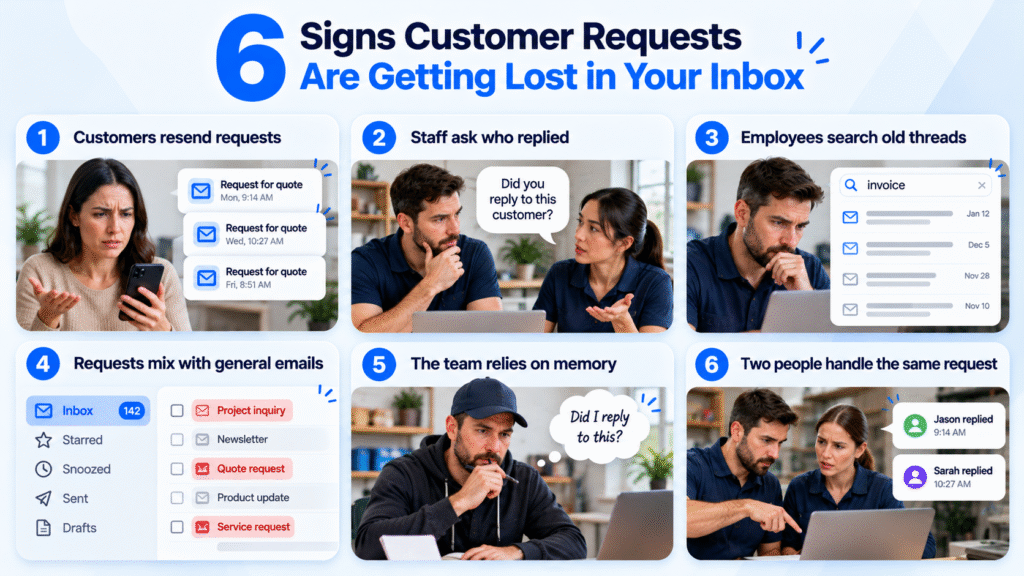
Review your email process if these patterns recur:
- Customers send a second message because they do not know whether the first was seen.
- Staff ask, “Did anyone respond to this?”
- Employees search old threads to work out what remains outstanding.
- Customer requests sit beside supplier emails and automated notices without a clear status.
- The team relies on memory to remember which messages still need action.
- Two employees start working on the same request, or each assumes the other person owns it.
One missed message does not establish that you need AI. Repeated uncertainty is the useful signal. It shows that the process does not make ownership and next actions visible enough for the people using it.
Clear customer email management gives every incoming request an owner, a status, and a defined next action.
Start with the request workflow before adding AI
Define what should happen after each common type of email arrives.
For a rescheduling request, the process might be: identify the customer and job, confirm who checks availability, record the decision, and send an approved response. For an invoice request, it may be: confirm the right customer and property, find the available invoice, and have the office send it.
Write down four elements for each recurring request:
- The information needed to handle it.
- The person or role responsible for the next action.
- The status that shows the request is still open or resolved.
- The exceptions that need a manager, estimator, or technician to decide.
Simple changes can help. A shared status field, a named owner, or a rule for when an email becomes a task may solve part of the problem before any automation is introduced.
If the process itself is unclear, an AI draft will repeat that uncertainty in a more fluent sentence. Establish the process first.
Where AI can support customer email management
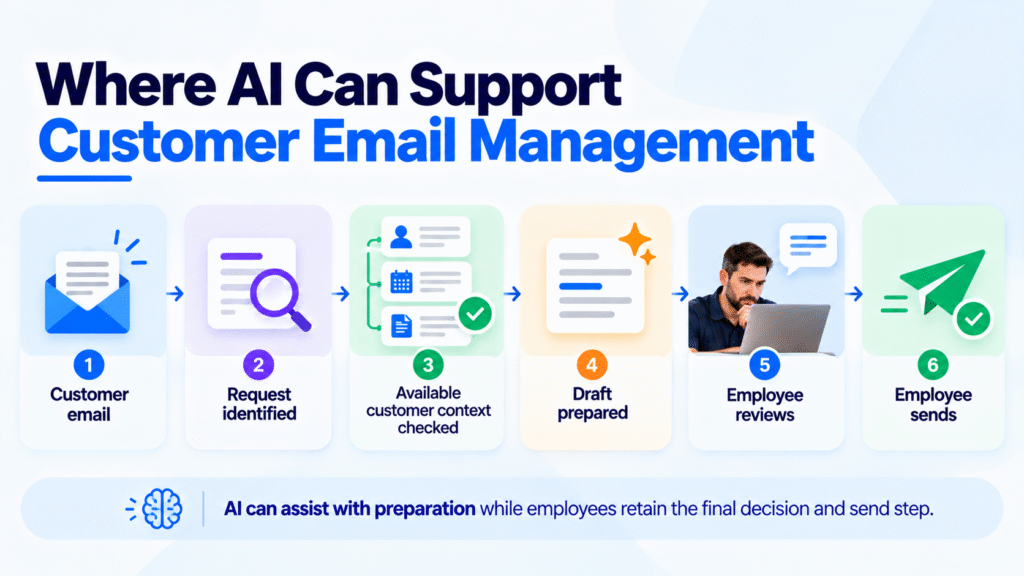
Once the next action is defined, AI can assist with repetitive preparation work.
An AI email workflow may read supported incoming messages, consider available customer or account information, and prepare an editable draft for a person to check. It can also be assessed for inbox triage or routing where the business rules and connected information support that use.
The AI Customer Support Email Assistant reads supported customer emails, checks available order or account details, and prepares editable reply drafts. Your team reviews, edits, and sends the response.
Email drafting and request tracking are different capabilities. An assistant can help prepare a reply, while request tracking records who owns a request, whether it remains open, and whether follow-up is complete. A business that needs ownership, status, escalation, or follow-up monitoring may need additional workflow changes or connected tools.
That review step matters. Complaints, pricing, warranties, contracts, technical advice, and sensitive situations need business judgment. An assistant should leave uncertain information visible instead of making a commitment on behalf of your business.
Before relying on any draft, verify that it has the right customer, job, and current information. NIST’s Generative AI Profile describes confidently presented false information as a risk, sometimes called confabulation.
A practical example: a plumbing question added to an old thread
Proposed workflow, not a client result: A plumbing customer replies to a previous service thread to ask whether a new issue can be added to the upcoming visit.
The message may look like a continuation of an older conversation. It still requires the office to check the existing booking, understand the new request, and decide whether a technician or scheduler needs to act.
An improved workflow would make the new request visible, assign it to the appropriate person, and show whether the customer has received a response. If an assistant prepares a draft, the employee checks that it does not imply that the new work has already been approved or added to the schedule.
The same principle applies to electrical estimate questions, HVAC maintenance requests, and roofing document requests. The workflow must make the request, owner, and next action clear.
Decide what should stay with people
Not every email should follow one automated route.
Routine requests with clear rules may be suitable for classification, routing, or draft preparation. Requests involving judgment should be passed to the right employee without pretending that the answer is already known.
| Suitable work to assess | Work that needs explicit human judgment |
|---|---|
| Identifying a routine message category | Pricing decisions |
| Preparing a draft from approved information | Warranty coverage |
| Flagging missing customer details | Contract interpretation |
| Routing a request to the right queue | Complaints and disputes |
| Showing that a reply needs review | Technical recommendations |
Assess the repeated steps that keep the team searching, copying, and chasing information before someone can make the decision that only they can make.
What to bring to a workflow review
Bring a small, representative sample rather than every email in the inbox.
Include one routine request, one message with missing information, one email that needed a decision from another team member, and one request that became difficult to find later. Remove personal information where possible before sharing examples.
Before sharing customer correspondence, request written information about access, retention, deletion, and model-training practices. The Office of the Privacy Commissioner of Canada’s generative AI principles provide useful questions about personal-information handling and safeguards.
Also list the records employees use before replying: the inbox, calendar, job-management system, estimate file, invoice record, or spreadsheet. This reveals whether the main issue is unclear ownership, scattered information, or both.
Diligentic’s AI Workflow Assessment examines repeated work, information requirements, and where AI may fit before a business commits to a build. If customer information sits in separate tools, system integration may be part of the eventual scope.
Make customer requests easier to see and handle
Customer email management is about giving each request a visible path from message to next action.
For Calgary contractors, that may start with clearer ownership and a better way to separate open requests from general correspondence. AI becomes worth assessing when the process is defined and the team repeatedly spends time gathering context or preparing similar responses.
Book your free workflow audit to review where customer requests enter your business, who handles them, and which manual steps are worth improving. The link starts a qualifying conversation; if there is a fit, Diligentic can arrange the audit.
Frequently asked questions
What is customer email management for contractors?
Customer email management is the process of identifying customer requests, assigning the next action, and showing whether the request remains open or resolved. It helps a contractor’s team distinguish messages that require action from general correspondence.
Why do customer requests get lost in busy contractor inboxes?
Requests can be opened and understood without being assigned, tracked, or answered. When the inbox also contains internal messages, supplier correspondence, and automated notices, an open customer request is easier to overlook.
Can AI help organize customer email requests?
AI can be assessed for classifying supported messages, surfacing missing information, routing work, and preparing drafts. The appropriate use depends on your defined workflow, available records, and employee review steps.
Should AI send customer replies without human review?
Diligentic’s email assistant prepares editable drafts for human review. Employees retain the final send decision, especially where a reply involves pricing, technical advice, a warranty, or a complaint.
When should a contractor evaluate an AI email assistant?
Evaluate an assistant when recurring request types have clear rules and employees repeatedly gather information before writing similar replies. Fix unclear ownership or missing process rules before expecting AI to improve the outcome.
About the author
Ajay Kumar
Founder and Director
About the author
Ajay Kumar is the founder and director of Diligentic Infotech, a Calgary AI automation company. He has 9+ years of hands-on technical experience and now focuses on helping small and medium businesses connect their existing tools and cut down manual work through practical AI automation. He leads with a clear focus on real, working solutions over one-time demos.

Posted on 5 Oct 2026
AI Receptionist For Contractors: Why Calgary Businesses Waste Office Time Handling Repetitive Customer Calls in 2026
Contractor offices can be busy even when every customer call is answered.
For many Calgary contractors, the challenge is not simply managing phone conversations. The bigger issue is the amount of employee time spent handling repetitive customer enquiries, collecting the same information, taking notes, and completing manual follow-up work.

Posted on 28 Sep 2026

Posted on 23 Sep 2026
Why Calgary Contractors Struggle With Manual Call Intake and How an AI Receptionist For Contractors Can Improve Customer Information Collection
For many Calgary contractors, the bigger operational challenge starts during the conversation. An employee needs to collect the right customer information, record it clearly, and make sure those details reach the right person or business system.