SHARE

How AI Automation Helps Calgary Electrical Companies Connect Scheduling, Invoicing, and Field Operations in 2026

AI automation for electrical companies can help a Calgary office turn free-form field notes into reviewable updates while connected rules move approved job details between scheduling and invoicing. Consider a crew that finishes work while the schedule still shows the job as open and the office is waiting for hours, materials and change approvals. AI can flag missing details or possible scope changes; employees confirm them before billing moves forward.
The best place to start is one job moving from schedule to site to invoice. Map who updates each record, what information is required and where staff must step in.
Table of Contents
Why a completed job can still be missing billing details
A scheduling tool can show who is assigned. A field app can hold photos and job notes. Accounting can hold invoices and payments. Each tool may work well on its own, but the office still has work to do if an update in one place never reaches the next person.
Consider a completed service job. The electrician marks it finished, then texts the office about an added task. The dispatcher sees “complete” but does not know whether a return visit is needed. Billing has the original price but no approved change. Copying those facts between tools is slow; guessing which version is correct is worse.
Before connecting anything, give each fact an owner. The schedule controls assignments and visit times. The job record holds field hours, materials and completion notes. An authorized employee records the customer’s approval of a priced change. Accounting controls the invoice and payment status. A contractor’s actual tools may divide those responsibilities differently, but the ownership must be clear.
Diligentic’s electrical contractor page describes similar field-to-office handoffs. This article focuses on a narrower question: where AI can help interpret information after the crew reports it, and where ordinary automation is enough.
Follow a circuit installation through five handoffs
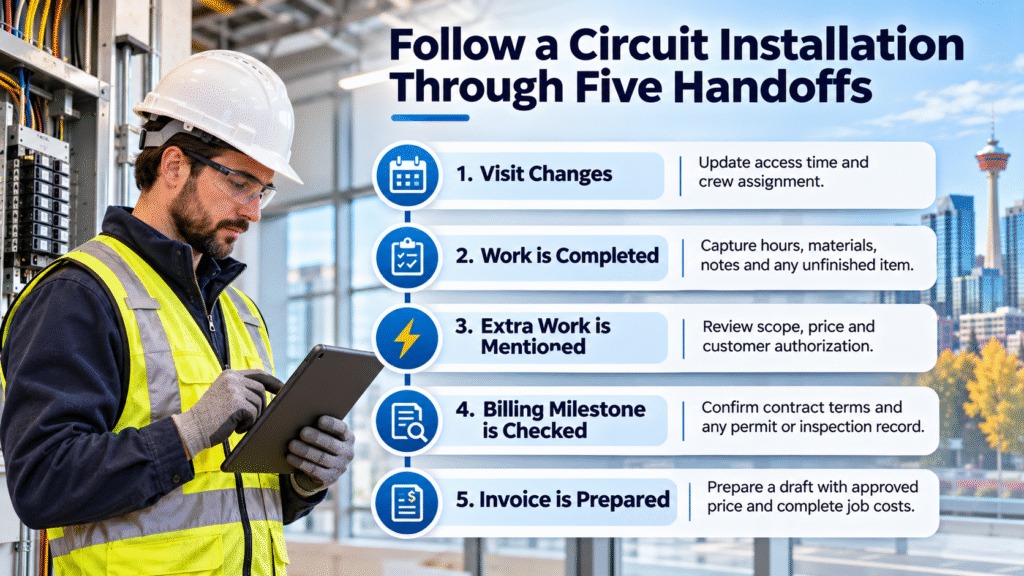
Hypothetical workflow, not a client result. A Calgary electrical contractor has scheduled a commercial circuit installation. The site contact changes the access time. During the visit, the electrician records extra labour and materials after the customer asks for an additional circuit. The office must clarify and price the added scope before billing it.
| Stage | What the team needs | Appropriate next action |
|---|---|---|
| Visit changes | Correct access time and crew assignment | Dispatcher approves the new slot; a rule updates the schedule and work order |
| Work is completed | Hours, materials, notes and any unfinished item | Electrician submits the job record; missing fields stay visible |
| Extra work is mentioned | Clear scope, price and customer authorization | AI may flag the note for review; an employee verifies and seeks approval |
| Billing milestone is checked | Contract terms and any applicable permit or inspection record | An employee confirms which conditions must be met before billing |
| Invoice is prepared | Approved price and complete job costs | A rule prepares a draft; the billing employee checks it against the contract |
The site-contact change should not silently reassign an electrician. Dispatch confirms the new time, then the connected workflow sends the approved update to the crew and the job record. If that transfer fails, the dispatcher needs an alert and a manual way to reach the electrician.
At the site, the electrician writes: “Added the work discussed with the site contact and used more cable.” That note is ambiguous. AI could flag it as a possible change and point to the original wording. The office checks the actual labour and materials, clarifies the scope, quotes the change and records the customer’s decision. The AI should neither price the work nor treat the site note as authorization.
Field completion alone does not establish that every billing condition has been met. The office checks hours, materials, completion notes, approved changes and the contract milestone. For work with applicable permits or inspections, it also checks the required documentation; the City of Calgary’s electrical-permit guidance explains local permit and inspection processes. An inspection is not automatically a prerequisite to every invoice; the job requirements and contract control the billing step.
Once the required records and approvals are complete, a rule can prepare an invoice draft. A contractor may require employee review for every invoice or allow routine invoices that satisfy documented approval rules to be issued automatically. Disputed charges, pricing exceptions and unapproved changes stay on hold. This keeps invoice preparation moving without turning an incomplete field note into a charge.
Where AI automation for electrical companies fits
Most transfers between scheduling, job and accounting tools do not require AI. If a dispatcher approves a new visit time, a rule can send that exact time to the work order. If a job is missing material entries, a rule can flag the missing field. These steps have known triggers and fields, making them easier to test.
AI is useful when the input varies. A technician may describe extra work in several ways, attach an unclear note or mention a follow-up while closing a job. AI can suggest a category, summarize the note or highlight a possible omission. Keep the original note alongside the suggestion so an employee can correct it. If the note conflicts with another record or remains unclear, hold it in a review queue rather than changing job status, scheduling or billing automatically.
Do not let an AI summary replace the original record. An unclear note remains unclear until someone checks it. Scheduling commitments, electrical safety, pricing and disputes belong with qualified employees and the customer where approval is required.
Diligentic’s process automation service covers the rules, approvals and exception handling around repeated work. AI should be added only where interpretation solves a specific problem that fixed fields and rules cannot handle well.
Connect the tools without losing control of the job
The integration method depends on the tools in use. A built-in connection may move a few fields. An API or webhook may support a more specific update. A scheduled export may be enough when immediate synchronization is unnecessary. Some older or specialized tools may require a custom connection or a manual step.
For each transfer, document five things: the source record, the event that starts it, the fields that move, the employee who approves any decision and the response when the update fails. Test duplicate customers, corrected addresses, declined change requests and jobs closed with incomplete field notes.
The aim is a dependable handoff, not a promise that every tool will show identical information instantly. Diligentic’s system integration service can assess which existing records can be connected and how failed updates should reach staff. A connection should make the office’s work clearer, not hide exceptions inside another dashboard.
Choose a first workflow the team can measure
Pick a repeated delay rather than trying to connect the whole business at once. A useful first candidate is a completed job waiting for invoice preparation because field details arrive in several places. Review a sample of recent jobs and record what was missing, who supplied it, how long the office spent resolving it and whether an approved change reached billing.
Then test the proposed workflow on the same kinds of jobs. Measure time spent entering and correcting information, missing-record alerts, failed transfers and employee review of AI suggestions. Time returned to staff is capacity; it becomes a cash saving only if an actual cost falls. Compare realistic benefits with implementation and ongoing support costs.
For broader context on dispatch and office-to-field records, Diligentic’s field-service guide explains how the job cycle works across trades. This article’s practical starting point is narrower: make one electrical job’s schedule, field record and invoice status agree before expanding the connections.
Frequently asked questions
Can AI schedule electricians automatically?
AI may help interpret a request or suggest a category, but assignments depend on crew availability, qualifications, site access and the contractor’s rules. Dispatch should approve changes that create customer or crew commitments.
Can a completed job create an invoice automatically?
A connected rule can prepare a draft when required job details are present. The contractor may require a person to review every invoice or allow routine invoices under documented approval rules; disputed charges and unapproved changes remain on hold.
Does every electrical business need a new platform?
No. If the current tools serve their individual purposes, connecting one handoff may be enough. If a tool cannot reliably share the needed information, the business may need to change the process or consider another system.
How can a contractor tell whether AI is worth adding?
Look for repeated notes or messages that staff must interpret before the next step can happen. Test AI suggestions against real examples, count corrections and confirm that employees still control approvals and exceptions.
Start with the handoff delaying billing
If completed work waits on field notes, approved changes or office follow-up, identify the missing handoff first. Clear record ownership and simple rules may solve part of it; AI can help when variable notes need interpretation. The right design should show staff what is ready, what needs review and who owns the next step.
Diligentic can review the scheduling, field and billing tools already in use and identify a practical first connection. Book a qualifying call to discuss your electrical workflow. If there is a fit, Ajay can arrange an in-person workflow audit in Calgary after the call.
About the author
Ajay Kumar
Founder and Director
About the author
Ajay Kumar is the founder and director of Diligentic Infotech, a Calgary AI automation company. He has 9+ years of hands-on technical experience and now focuses on helping small and medium businesses connect their existing tools and cut down manual work through practical AI automation. He leads with a clear focus on real, working solutions over one-time demos.

Posted on 5 Nov 2026
How Calgary Electrical Contractors Can Reduce Double Data Entry by Connecting Their Software
An electrical contractor should not have to type an approved customer address into an estimate, then again into a work order, schedule and invoice. Electrical business software integration connects those handoffs so the right record can move at the right time. It can eliminate re-entry at a defined step, provided the tools can exchange dependable data and someone handles exceptions.

Posted on 22 Jul 2026
Why Electrical Companies Calgary Are Struggling to Scale Without Connected Business Systems in 2026
Many electrical companies Calgary struggle to scale not because they lack software, but because the software they already use operates separately. Scheduling, dispatch, CRM, accounting, invoicing, estimating, GPS tracking, and field operations often sit in different systems with weak information flow between them.

Posted on 21 May 2026
How Field Service Management Software Improves HVAC, Plumbing, and Electrical Operations
Field service management software connects the work that happens in the office with the work technicians complete in the field. It gives HVAC, plumbing, and electrical businesses one reliable process for receiving a service request, assigning the right person, recording job details, invoicing the customer, and reviewing performance.